Blog Of Sem

VISUAL STUDIO C# DLL CLASS YORUM EKLEMEK

Önce dll projesinde debug project propertiesde build ekranında XML documantion filei tikle
ve methodların üzeirne bunu yazınca otomatik tanımlanır ///
ve gerekeni içine yaz
Ör:
        /// <summary>
        /// <para>Aciklama: Önce ana projeye add devitem Progress Indicator ekle adını PROGRESSFORM yap</para>
        /// Ornek Kod:BMS_DLL.DX.SPLASHSCREENBASLA(typeof(PROGRESSFORM), this, "test");
        /// </summary>
        public static void SPLASHSCREENBASLA(Type _PROGRESSFORM, Form _this, string _NEYAPILIYOR)
        {
            try
            {
                SplashScreenManager.ShowForm(_this, _PROGRESSFORM , true, true, false);
                SplashScreenManager.Default.SetWaitFormCaption(_NEYAPILIYOR);
                SplashScreenManager.Default.SetWaitFormDescription("");
            }
            catch { }
        }

burdaki para ayrı satır anlamındadır

vs 2017 c# extension

https://marketplace.visualstudio.com/items?itemName=lostalloy.LocalHistory-for-Visual-Studio

solution explorerda sağ tıkla local historyı seç

c# windows service debug

Use the following code in service OnStart method:
System.Diagnostics.Debugger.Launch();

windows 7 , 8 , 10 wifi sifresi görünmesin

regedit yönetici olarak çalıştır
export yap yedek alsın ne olur ne olmaz

bunu bul : {86F80216-5DD6-4F43-953B-35EF40A35AEE}

sağ tıkla ve yetki ayarla(permissin)
advanced owner change to computer name for example semspc

ok ok -

ve sil {86F80216-5DD6-4F43-953B-35EF40A35AEE}


VISUAL STUDIO C# SQL SERVER CONNECTION HELPER

using System.Data;
using System.Data.SqlClient;
using System.Windows.Forms;
using DevExpress.XtraGrid;
using DevExpress.XtraGrid.Views.Grid;

namespace BMS_PDKS
{
    public class SQLHELPER
    {
        string baglanticumlesi = string.Format("Server={0}; Database={1}; User Id ={2};Password ={3}", CFG_TEMPLATE.CONFIG.LGDBSERVER, CFG_TEMPLATE.CONFIG.LGDBDATABASE, CFG_TEMPLATE.CONFIG.LGDBUSERNAME, CFG_TEMPLATE.CONFIG.LGDBPASSWORD);
        SqlConnection con;
        SqlDataAdapter adtr;
        public SqlConnection baglanti()
        {
            con = new SqlConnection(baglanticumlesi);
            if (con.State == ConnectionState.Closed)
            {
                con.Open();
            }
            return con;
        }
        //public DataTable veri_getirme(string sqlcumle, DevExpress.XtraGrid.GridControl dtgrd)
        public DataTable GET_B_CAPIFIRM(GridControl dtgrdc,GridView dtgrdv)
        {
            DataTable dt = new DataTable();
            dtgrdv.Columns.Clear();
            try
            {
                using (adtr = new SqlDataAdapter("select * from B_CAPIFIRM", baglanti()))
                { adtr.Fill(dt); dtgrdc.DataSource = dt; }
            }
            catch (System.Exception ex) { MessageBox.Show(ex.Message); }
            return dt;
        }
        public DataTable GET_B_CAPIUSER(GridControl dtgrdc, GridView dtgrdv)
        {
            DataTable dt = new DataTable();
            dtgrdv.Columns.Clear();
            try
            {
                using (adtr = new SqlDataAdapter("select * from B_CAPIUSER", baglanti()))
                { adtr.Fill(dt); dtgrdc.DataSource = dt; }
            }
            catch (System.Exception ex) { MessageBox.Show(ex.Message); }
            return dt;
        }

    }
}
--

DAHA SONRA ANA FORMDA DEVEXPRESS GRIDVIEW YARAT VE ŞU ŞEKİLDE ÇAĞIR:
 
        SQLHELPER sqlhelper = new SQLHELPER();

        private void button1_Click(object sender, EventArgs e)
        {
            sqlhelper.GET_B_CAPIFIRM( gridControl1,gridView1);
        }
        private void button2_Click(object sender, EventArgs e)
        {
            sqlhelper.GET_B_CAPIUSER(gridControl1, gridView1);
        }

C# SQL E TARIH AKTARIM UYGUN FORMAT

DateTime.Now.ToString("yyyy-MM-dd HH:mm:ss")


devexpress datetime component automove to next için
masktype 2 tane var ikisinde datetimeadvancingcaret yap


        public Form1()
        {
            InitializeComponent();
            Thread.CurrentThread.CurrentCulture = CultureInfo.InvariantCulture;


ercanın kodlarda
            CultureInfo tr = new CultureInfo("tr-TR");

            Thread.CurrentThread.CurrentCulture = tr;

Unity 3d 5 admob google reklam ekleme

Önce indir ve unitye ekle: https://github.com/googleads/googleads-mobile-plugins/releases/latest
GoogleMobileAds.unitypackage


Sonra assetse Adscirit adında c# scripti yarat ve çift tıkla.


Notepad++ Plugin with Folder explorer treeview

https://notepad-plus-plus.org/repository/7.x/7.6/npp.7.6.Installer.exe

open folder as workspace

ve ftp plugin adminden indir nppftp

SQL SERVER TAKVIM TURKCE


  ALTER VIEW BM_TAKVIM AS
WITH Calender AS (
    SELECT CAST('2019-01-01' AS DATETIME) AS dt
    UNION ALL
    SELECT dt + 1 FROM Calender
    WHERE dt + 1 <=  CAST('2019-12-31' AS DATETIME)
)
SELECT
dt


,CASE
WHEN DATENAME (Month,dt)='January' THEN 'Ocak'
WHEN DATENAME (Month,dt)='February' THEN 'Şubat'
WHEN DATENAME (Month,dt)='March' THEN 'Mart'
WHEN DATENAME (Month,dt)='April' THEN 'Nisan'
WHEN DATENAME (Month,dt)='May' THEN 'Mayıs'
WHEN DATENAME (Month,dt)='June' THEN 'Haziran'
WHEN DATENAME (Month,dt)='July' THEN 'Temmuz'
WHEN DATENAME (Month,dt)='August' THEN 'Ağustos'
WHEN DATENAME (Month,dt)='September' THEN 'Eylül'
WHEN DATENAME (Month,dt)='October' THEN 'Ekim'
WHEN DATENAME (Month,dt)='November' THEN 'Kasım'
WHEN DATENAME (Month,dt)='December' THEN 'Aralık' ELSE '' END Ay
,CASE WHEN DATENAME (Weekday,dt)='Monday' THEN 'Pazartesi'
WHEN DATENAME (Weekday,dt)='Tuesday' THEN 'Salı'
WHEN DATENAME (Weekday,dt)='Wednesday' THEN 'Çarşamba'
WHEN DATENAME (Weekday,dt)='Thursday' THEN 'Perşembe'
WHEN DATENAME (Weekday,dt)='Friday' THEN 'Cuma'
WHEN DATENAME (Weekday,dt)='Saturday' THEN 'Cumartesi'
WHEN DATENAME (Weekday,dt)='Sunday' THEN 'Pazar' ELSE '' END Gün
,Hafta = DATEPART(WEEK, dt)  FROM Calender

 GO

  SELECT *
 FROM BM_TAKVIM WITH(NOLOCK)
 Option(MaxRecursion 0)

SQL SERVER DECIMAL TWO DIGIT

CONVERT(DECIMAL(10,2),sum(AMOUNT))
CONVERT(DECIMAL(10,2),PRICE)

devexpress splash screen

            SplashScreenManager.ShowForm(this, typeof(PROGRESSFORM), true, true, false);
            SplashScreenManager.Default.SetWaitFormCaption("LÜTFEN BEKLEYİN.");
            SplashScreenManager.Default.SetWaitFormDescription("");

------İŞLEMLER


            SplashScreenManager.CloseForm(false);
            MessageBox.Show("TAMAMLANDI", "", MessageBoxButtons.OK, MessageBoxIcon.Information);

SQL SERVER BIRDEN FAZLA COLUMN DUBLICATE EKLEMESIN

ALTER TABLE [dbo].[PDKSEXCEL]   
ADD CONSTRAINT [UQ_SICILNO_TARIH_SAAT] UNIQUE NONCLUSTERED
(
    [SICILNO],   [TARIH],[SAAT]
)

DEVEXPRESS WCF GRIDVIEW UPDATE SQL

        private void gridView1_RowUpdated(object sender, DevExpress.XtraGrid.Views.Base.RowObjectEventArgs e)
        {
            usersTableAdapter1.Update(bmS_SISTEMDataSet1);
        }

C# ASPXGRIDVIEW GET TOTAL SUMMARY

protected void Buttonhepsiniode_Click(object sender, EventArgs e)
{
 
    //for (int i = 0; i < ASPxGridView2.VisibleRowCount; i++)
    //{
    //    var items = ASPxGridView2.GetRowValues(i, new string[] { "FISNO", "TL_BORC" }) as object[];
    //    // ASPxListBox1.Items.Add(rowValues[0].ToString());
    //    SqlConnection con = new SqlConnection(ConfigurationManager.ConnectionStrings["CarringtonWebConnectionString1"].ConnectionString);
    //    con.Open();
    //    SqlCommand cmd = new SqlCommand("update ACIKHESAP set ODEME_DURUMU=2, ODENEN_TUTAR=" + items[1].ToString() + " where ID=" + items[0].ToString(), con);
    //    cmd.ExecuteNonQuery();
    //    Labeltesekkurler.Visible = true;
    //}
    Decimal SMTUTAR = Convert.ToDecimal(ASPxGridView2.GetTotalSummaryValue(ASPxGridView2.TotalSummary["TL_BORC"]));
    Global.TUTAR = null;
    Global.TUTAR = SMTUTAR.ToString();
    Server.Transfer("payment.aspx");
}

C# DEVEXPRESS ASPXGRIDVIEW SELECTED ROWS TOTAL

protected void Button1_Click(object sender, EventArgs e)
{
    //List<object> SelectedDebts = grid.GetSelectedFieldValues(new string[] { "FISNO", "TL_BORC" });
    //foreach (object debts in SelectedDebts)
    //{
    //    IList items = debts as IList;
    //    if (items == null) return;
    //    SqlConnection con = new SqlConnection(ConfigurationManager.ConnectionStrings["CarringtonWebConnectionString1"].ConnectionString);
    //    con.Open();
    //    SqlCommand cmd = new SqlCommand("update ACIKHESAP set ODEME_DURUMU=1, ODENEN_TUTAR=" + items[1].ToString() + " where ID=" + items[0].ToString(), con);
    //    cmd.ExecuteNonQuery();
    //    Labeltesekkurler.Visible = true;
    //}
 
 
    //List<object> SelectedDebts = grid.GetSelectedFieldValues(new string[] { "FISNO", "TL_BORC" });
    Decimal selectedTUTAR = 0;
    foreach (object value in ASPxGridView2.GetSelectedFieldValues("TL_BORC"))
    {
        {
            selectedTUTAR += Convert.ToDecimal(value);
        }
 
    }
 
    Global.TUTAR = null;
    Global.TUTAR = selectedTUTAR.ToString();
    Server.Transfer("payment.aspx");
 
}

LOGO SQL INFO KULLANIMI BARKOD YAZDA MIKTAR CIKSIN

_SQLINFO ("AMOUNT", "LG_219_01_STLINE", "LOGICALREF='"+STR(R9.logicalRef)+"'")


c# devexpress windows form skin

new c# windows form NOT DEVEXPRESS


add reference devexpress.bonusskins
devexpres.utils
devexpress.utils ui


DELETE FORM1 AND ADD DEVEXPRESS ITEM FORM

PROGRAM.CS :

            DevExpress.UserSkins.BonusSkins.Register();
            DevExpress.LookAndFeel.UserLookAndFeel.Default.SetSkinStyle("McSkin");
            Application.EnableVisualStyles();
            Application.SetCompatibleTextRenderingDefault(false);
            Application.Run(new Form1());

visual c# encrypt decrypt text file

First create class : encrypt_decrypt.cs
inside:
using System;
using System.Security.Cryptography;
using System.Text;
 
namespace RestWebinarSample
{
 
    class Encryptor
    {
        public static string IV = "1a1a1a1a1a1a1a1a";
        public static string Key = "1a1a1a1a1a1a1a1a1a1a1a1a1a1a1a13";
 
        public static string Encrypt(string decrypted)
        {
            byte[] textbytes = ASCIIEncoding.ASCII.GetBytes(decrypted);
            AesCryptoServiceProvider endec = new AesCryptoServiceProvider();
            endec.BlockSize = 128;
            endec.KeySize = 256;
            endec.IV = ASCIIEncoding.ASCII.GetBytes(IV);
            endec.Key = ASCIIEncoding.ASCII.GetBytes(Key);
            endec.Padding = PaddingMode.PKCS7;
            endec.Mode = CipherMode.CBC;
            ICryptoTransform icrypt = endec.CreateEncryptor(endec.Key, endec.IV);
            byte[] enc = icrypt.TransformFinalBlock(textbytes, 0, textbytes.Length);
            icrypt.Dispose();
            return Convert.ToBase64String(enc);
        }
 
        public static string Decrypted(string encrypted)
        {
            byte[] textbytes = Convert.FromBase64String(encrypted);
            AesCryptoServiceProvider endec = new AesCryptoServiceProvider();
            endec.BlockSize = 128;
            endec.KeySize = 256;
            endec.IV = ASCIIEncoding.ASCII.GetBytes(IV);
            endec.Key = ASCIIEncoding.ASCII.GetBytes(Key);
            endec.Padding = PaddingMode.PKCS7;
            endec.Mode = CipherMode.CBC;
            ICryptoTransform icrypt = endec.CreateDecryptor(endec.Key, endec.IV);
            byte[] enc = icrypt.TransformFinalBlock(textbytes, 0, textbytes.Length);
            icrypt.Dispose();
            return System.Text.ASCIIEncoding.ASCII.GetString(enc);
        }
    }
}
 

then 2 buttons encrypt and decrypt

private void encrypt_Click(object sender, EventArgs e)
{
 
    Directory.CreateDirectory("data\\");
 
    var sw = new StreamWriter("data\\" + "data.ls");
 
    string enctxt = Encryptor.Encrypt("willbeencrypted");
 
    sw.WriteLine(enctxt);
 
    sw.Close();
}
 
private void decrypt_Click(object sender, EventArgs e)
{
    StreamReader sr = new StreamReader(Application.StartupPath + "\\data\\" + "data.ls");
    string line = sr.ReadLine();
 
    MessageBox.Show(Encryptor.Decrypted(Convert.ToString(line)));
}

EXCEPTION WRITE TO LOG

public void WRITELOG(string ERROR, Exception E, int TYPE)
 {
     try
     {
         string directory = AppDomain.CurrentDomain.BaseDirectory + "logs\\";
         Directory.CreateDirectory(directory);
         string EXTENTION = "";
         if (TYPE == 0)
             EXTENTION = " - ERRORS";
         else if (TYPE == 1)
             EXTENTION = " - STATUS";
         else if (TYPE == 2)
             EXTENTION = " - EXPS";
         string path = directory + DateTime.Now.ToString("yyyy.MM.dd" + EXTENTION) + ".txt";
         if (!File.Exists(path))
             File.Create(path).Close();
         else
         {
             if (TYPE > 0 || E == null)
                 File.AppendAllText(path, Environment.NewLine);
             else
                 File.AppendAllText(path, Environment.NewLine + Environment.NewLine +
                     Environment.NewLine + Environment.NewLine + Environment.NewLine);
         }
         File.AppendAllText(path, DateTime.Now.ToString("yyyy.MM.dd HH:mm:ss"+ " : " + ERROR +
             Environment.NewLine + (E != null ? " ----- HATA : ----- " + E.ToString() : ""));
     }
     catch { }
 }

C# WEB SERVICE SORGULAMASI

using System;
using System.Windows.Forms;
 
namespace BMSLicenseKontrol
{
    public partial class Form1 : DevExpress.XtraEditors.XtraForm
    {
        public Form1()
        {
            InitializeComponent();
        }
 
 
        private void button1_Click(object sender, EventArgs e)
        {


        }
 
        private void simpleButton1_Click(object sender, EventArgs e)
        {
            ServiceBMSLicense.LicenseServiceSoapClient SBMSLicense = new ServiceBMSLicense.LicenseServiceSoapClient();
            SBMSLicense.LicenseQuery(lisans.Text, GetStatikIp.GetIPAddress());
            MessageBox.Show(SBMSLicense.LicenseQuery(lisans.Text, GetStatikIp.GetIPAddress()).Rows[0][6].ToString()); //0rıncı row 6ıncı column MSGBOXDA GOSTER
            gridControl1.DataSource = SBMSLicense.LicenseQuery(lisans.Text, GetStatikIp.GetIPAddress());//ISDERSEN DIREK DONUSU GRIDVIEWDE GOSTER
 
 
        }
    }
}

c# CLASS GET STATIK IP

using System;
using System.IO;
using System.Net;
 
namespace BMSLicenseKontrol
{
    class GetStatikIp
    {
        public static string GetIPAddress()
 
        {
 
            String address = "";
 
            WebRequest request = WebRequest.Create("http://checkip.dyndns.org/");
 
            using (WebResponse response = request.GetResponse())
 
            using (StreamReader stream = new StreamReader(response.GetResponseStream()))
 
            {
 
                address = stream.ReadToEnd();
 
            }
 
            int first = address.IndexOf("Address: "+ 9;
 
            int last = address.LastIndexOf("</body>");
 
            address = address.Substring(first, last - first);
 
            return address;
 
        }
    }
}

Aspxgridview selected ve toplu işlemleri

--aşağıdaki kod bütün seçili rowlara işlem yapar
            List<object> SelectedUsers = grid.GetSelectedFieldValues(new string[] { "ID", "TUTAR" });
            foreach (object user in SelectedUsers)
            {
                IList items = user as IList;
                if (items == null) return;
                SqlConnection con = new SqlConnection(ConfigurationManager.ConnectionStrings["CarringtonWebConnectionString1"].ConnectionString);
                con.Open();
                SqlCommand cmd = new SqlCommand("update ACIKHESAP set ODEME_DURUMU=1, ODENEN_TUTAR=" + items[1].ToString() + " where ID=" + items[0].ToString(), con);
                cmd.ExecuteNonQuery();
            }


---aşağıdaki kod seçili seçili deil farketmez hepsine işlem yapar
            for (int i = 0; i < grid.VisibleRowCount; i++)
            {
                var items = grid.GetRowValues(i, new string[] { "ID", "TUTAR" }) as object[];
                // ASPxListBox1.Items.Add(rowValues[0].ToString());
                //you can add these key in a list here

                SqlConnection con = new SqlConnection(ConfigurationManager.ConnectionStrings["CarringtonWebConnectionString1"].ConnectionString);
                con.Open();
                SqlCommand cmd = new SqlCommand("update ACIKHESAP set ODEME_DURUMU=2, ODENEN_TUTAR=" + items[1].ToString() + " where ID=" + items[0].ToString(), con);
                cmd.ExecuteNonQuery();

Sql toplu hareket görenleri kasmadan silme


declare @counter int
declare @numOfRecords int
declare @batchsize int

set @numOfRecords = 700924 --burdaki rakam databasei acip tables yazisini secip f7 basinca rowcountu en cok olan rakam

set @counter = 0
set @batchsize = 2500

set rowcount @batchsize
while @counter < (@numOfRecords/@batchsize) +1
begin
set @counter = @counter + 1
delete Erp_InventoryReceiptItem

update Erp_Invoice set InventoryReceiptId = null

update Erp_InventoryReceiptAttachment set  InventoryReceiptId = null

delete Erp_InventoryReceiptAttachment

delete Erp_InvoiceAttachment

delete Erp_WorkOrderProduction
UPDATE  Erp_InventoryReceiptItem set InventoryReceiptId=null
delete Erp_InventoryReceipt

update Erp_InventoryReceipt set InvoiceId=null
delete Erp_Invoice

delete Erp_BankAccountTotal

delete Erp_BankCredit
update Erp_CurrentAccountReceipt set BankReceiptId=null
delete Erp_BankReceiptItem

update Erp_ChequeReceipt set BankReceiptId=null

delete Erp_ChequeReceiptItem

delete Erp_ChequeReceiptAttachment

delete Erp_ChequeReceipt

delete Erp_BankReceiptAttachment

delete Erp_BankReceipt

delete Erp_CashTotalItem

delete Erp_CashTotal

delete Erp_Cheque

delete Erp_OrderReceiptItem

delete Erp_OrderReceiptAttachment

delete Erp_OrderReceipt

delete Erp_ContractItem

delete Erp_ContractAttachment

delete Erp_Contract

update Erp_InventoryReceipt set CurrentAccountReceiptId = null
delete Erp_CurrentAccountReceiptItem

delete Erp_CurrentAccountReceiptAttachment

delete Erp_CurrentAccountReceipt

delete Erp_CurrentAccountTotal

delete Erp_QuotationReceiptItem

delete Erp_QuotationReceiptAttachment

delete Erp_QuotationReceipt

delete Erp_DemandReceiptItem

delete Erp_DemandReceiptAttachment

delete Erp_DemandReceipt

delete Erp_WorkOrderItem

delete Erp_WorkOrderAttachment

delete Erp_WorkOrderExplanation

delete Erp_WorkOrder

delete Erp_GLReceiptItem
update Erp_InventoryReceipt set GLReceiptId=null

delete Erp_GLReceipt

Delete Erp_InventoryTotal

delete Erp_ReceiptPaymentItem

delete Meta_ForexRate

delete Erp_ServiceTotal

Delete Erp_GLAccountTotal

delete Erp_BankAccountTotal
update Erp_InventoryReceipt set PosReceiptId=null
delete erp_pos
delete Erp_InventoryReceipt
delete RPL_TaskTarget
delete Rpl_TaskItem
delete RPL_Task
delete Rpl_Xref
delete [LiveHareketler].[dbo].[Replication]
end
set rowcount 0


truncate table Log_Transaction


shrink işlemi:
USE LiveHareketler;
GO
ALTER DATABASE LiveHareketler
SET RECOVERY SIMPLE;
GO

--Datadakı log dosyasını shrınk yap yani database sağ tıkla task shrink files log->reorganize page 0 ve tamam ve sonrasındada yine databasee sağ tık task shrink database ok

ALTER DATABASE LiveHareketler
SET RECOVERY FULL;
GO

visual studio asp datasource olarak xmli kullanmak

new empty web project
insert new web page adı index.aspx
insert new item xml
içine :
<?xml version="1.0" encoding="utf-8" ?>
<Students>
  <Student
    StudentID="1"
    FirstName="A"
    LastName="AA"
    TotalMarks="100">
  </Student>
  <Student
    StudentID="2"
    FirstName="B"
    LastName="BB"
    TotalMarks="200">
  </Student>
  <Student
    StudentID="3"
    FirstName="C"
    LastName="CC"
    TotalMarks="500">
  </Student>
  <Student
    StudentID="4"
    FirstName="D"
    LastName="DD"
    TotalMarks="700">
  </Student>
</Students>

ve gridview at ve datasource xmlden xml dosyasını seç

alastyr plesk windows hostinge pcdeki sql serverden baglanma

once pleski acip sol tarafdan databesisden yeni kullanici yarat
ms sql secili olsun allow remote connections from secip altina who.isden ipni yaz

daha sonra database yeni database server sql server

sql serverede
server name sadece ornekserver.com yazilmasi yeterli
login pleskte database kısmında user managementta yaratilan kullanici ve parola

-------------------
visual studio asp proje deploy,
pleske visual studio aspxlerin projelerini ataiblmek icin alastyre pleskte web deployu aktif etmelerini soyle.
bu tarz link mail atacaklar sana https://mywebsite.xyz:8172/msdeploy.axd?site=mywebsite.xyz
bunu visual studioda solutiona sag tikla publishden web deployu secerek.

server: https://mywebsite.xyz:8172/msdeploy.axd?site=mywebsite.xyz
site: mywebsite.xyz/sw/test
user name:mywebsite (hostu alirken attiklari kullanici adi)
password:parola (hostu alirken attiklari kullanici adi)
destination url:mywebsite.xyz/sw/test

git ile projeyi sifirdan githuba yukleme

once projenin oldugu klasore sag tikla git bash here de

githubda new repositiries yarat ornek ad : asp_admin_panel_master_session
git init
git remote add origin https://github.com/semt20/asp_admin_panel_master_session.git
git add .
git commit -m "initial commit"
git push origin master


Visual studio gitlabdaki deişen kodları almak için :
team explorer
Sync
Fetch
Pull

devexpress aspx 17.2 localisation language

devexpress aspx turkcelestirme once projede web.confige gir ve   <globalization culture="tr-Tr" uiCulture="tr-Tr"/> ekle daha sonra devexpressin sitesinden
https://localization.devexpress.com/Localization/List turkceyi indir projenin bulundugu bin icine tr diye klasor ac ve icine at aynı zamanda C:\Program Files (x86)\DevExpress 17.2\Components\Bin\Framework\ burdada tr diye bir klasor ac ve icine at

ASPXGRIDVIEW İşlemleri

Gridviewde seçili satırın bilgisini alabilme :
        protected void ASPxGridView1_SelectionChanged(object sender, EventArgs e)
        {
            var products = ASPxGridView1.GetSelectedFieldValues("NAME");
            Label1.Text = products[0].ToString();
        }


Gridviewin Sonuna İşlemler Seç eklemek için source da sona ekle
            <dx:GridViewDataHyperLinkColumn Caption="İşlemler" FieldName="ID">
                <PropertiesHyperLinkEdit NavigateUrlFormatString="page.aspx?id={0}" Text="SEÇ" />
            </dx:GridViewDataHyperLinkColumn>


        </Columns>
    </dx:ASPxGridView>


Gridview devexpress 7.2 sonrası için gecerli export Gridview
<Columns>un altina ekle
 <SettingsExport EnableClientSideExportAPI="true" ExcelExportMode="WYSIWYG" />

<Columns>un ustune ekle
        <Toolbars>
            <dx:GridViewToolbar EnableAdaptivity="true">
                <Items>
                    <dx:GridViewToolbarItem Command="ExportToPdf" />
                    <dx:GridViewToolbarItem Command="ExportToXls" />
                    <dx:GridViewToolbarItem Command="ExportToXlsx" />
                    <dx:GridViewToolbarItem Command="ExportToDocx" />
                    <dx:GridViewToolbarItem Command="ExportToRtf" />
                    <dx:GridViewToolbarItem Command="ExportToCsv" />
                </Items>
            </dx:GridViewToolbar>
        </Toolbars>


Gridview grup category combobox ve baglantisi 
birinci sqldatasource_musteriler yarat ve bunu aspxgridviewe bind
Ikinci datasource sqldatasource_musterigruplari  yarat  bu bir yere bind olmayacak

Sqlden iki tablo yarat birinin adi musteri(id,adi,grupid) olsun
digeride musteri_grup (id,grup_adi) olsun

aspxgridview designerda columnsa tikla combobox column ekle captionunu grup yap, Fieldname grupid sec, sag tabda comboboxpropertiesde datasourceid musteri_gruplarini sec text field grup_adi , valuefield=id 


Gridview Horizontal scrollbar 

    <dx:ASPxGridView Width="100%" ID="ASPxGridView1" runat="server" AutoGenerateColumns="False" DataSourceID="SqlDataSource1" KeyFieldName="ID" OnCellEditorInitialize="ASPxGridView1_CellEditorInitialize">

        <Settings ShowFilterRow="True" ShowGroupPanel="True" />

        <Settings HorizontalScrollBarMode="Auto" />

        <Settings VerticalScrollBarMode="Auto" />

Datasource eklemede hata alırsan sol taraftan server explorerden modify deyip save passwordu seç


Gridview  Required zorunlu alan ayari
Designerda ac ve columnsdan zorunlu alana tıkla ve sağda textboxpropertiesden en aşağıda validation settingste requiredi true yap


Master Detail Grid
ONCE 2 TANE SQLDATASOURCE VE 2 TANE ASPXGRIDVIEW YARAT BIRI MUSTERILER DIGERI MUSTERI HAREKETLER
MUSTERILERI NORMAL TABLODAN AL ASPXGRIDVIEW MUSTERILERIN SETTINGS DETAILDE DETAILROWU TRUE YAP,

MUSTERI HAREKETLERINIDE AL WHERE KISMINA TIKLA COLUMN MUSTERI_ID OPERATOR " = "  , SOURCE SESSION , SESSION FIELD = MUSTERI_ID

VE DAHA SONRA KODA EKLE
        protected void ASPxGridViewmusterihareketler_BeforePerformDataSelect(object sender, EventArgs e)
        {
            Session["MUSTERI_ID"] = (sender as ASPxGridView).GetMasterRowKeyValue();
        }


SON OLARAKDA ASPXGRIDVIEWMUSTERILERE TIKLA EDITTEMPLATE VE DETAILROWU SEC VE ASPXGRIDMUSTERIHAREKETLERINI ICINE SURUKLE VE END TEMPLATE YAP


Gridviewda son kolumun genişliğini max yapmak
        <Columns>
            <dx:GridViewCommandColumn ShowDeleteButton="True" ShowEditButton="True" ShowNewButtonInHeader="True" VisibleIndex="0">
            </dx:GridViewCommandColumn>
            <dx:GridViewDataTextColumn FieldName="ID" ReadOnly="True" VisibleIndex="1">
                <EditFormSettings Visible="False" />
            </dx:GridViewDataTextColumn>
            <dx:GridViewDataTextColumn FieldName="ADI" VisibleIndex="2" Width="100%">
            </dx:GridViewDataTextColumn>
        </Columns>


gridview detay masterda detay width sorunu once masterin altina ekle :
    <dx:ASPxGridView Width="100%" 
        <Settings HorizontalScrollBarMode="Auto" />
        <Settings VerticalScrollBarMode="Auto" />

sonra masterin son colomunun widthini %100 yap
  <dx:GridViewDataTextColumn FieldName="ADI" VisibleIndex="2" Width="100%">

sonra detaya ekle
   <dx:ASPxGridView2 Width="100%" 
        <Settings HorizontalScrollBarMode="Auto" />
        <Settings VerticalScrollBarMode="Auto" />

Github visual studio asp .net core projesi alip uyumlamak

git clone https://github.com/etrupja/DrinkAndGo.git

sonra projeyi aç appsettings.jsondan veritabanını deiş
Data Source=DESKTOP-PA213SA;Initial Catalog=dtest;Persist Security Info=True;User ID=sa;Password=2323211

view other window package manager consolea gir
ve aşağıya yazz önce
add-migration "Initial"
update-database

Live Hareket Goren istenmeyen malzemeleri toplu olarak sqlden silme

Silinmesi isdenilen malzemelerin recidleri () lerin icine yazilir

--update Erp_InventoryPriceList set UnitSetItemId = null where InventoryId in
--()

--delete Erp_InventoryPriceList where InventoryId in
--()

--delete Erp_RecipeItem from Erp_RecipeItem RI 
--where RecipeId = (Select RecId from Erp_Recipe R where R.RecId = RI.RecipeId and R.InventoryId in
--()
--)


--delete Erp_Recipe  where InventoryId in
--()

--update Erp_Inventory Set RecipeUnitItemId = null where RecId in
--()

--update Erp_InventoryUnitItemSize set InventoryId = null where InventoryId in
--()

--delete Erp_InventoryUnitItemSize where InventoryId in
--()

--delete Erp_InventoryBarcode where InventoryId in
--()

--delete Erp_InventoryWarehouse where InventoryId in
--()

--delete Erp_Project where InventoryId in
--()

--delete Erp_FixedAssetDepreciation where InventoryId in
--()

--delete Erp_InventoryExplanation where InventoryId in
--()

--delete Erp_InventoryAlternative  where InventoryId in
--()

--delete Erp_FixedAssetExpense  where InventoryId in
--()

--delete Erp_InventoryAttachment where InventoryId in
--()

--delete Erp_InitialCostItem from Erp_InitialCostItem IC 
--where InitialCostId = (Select RecId from Erp_InitialCost I where I.RecId = IC.InitialCostId and I.InventoryId in
--()
--)

--delete Erp_InitialCost where InventoryId in
--()

--delete Erp_RecipeItem where InventoryId in
--()

--delete Erp_RouteItem from Erp_RouteItem RI where RouteId = (select RecId from Erp_Route R where RI.RouteId=R.RecId and R.InventoryId in
--()
--)

--delete Erp_Route where InventoryId in
--()

--delete Erp_Inventory where RecId in
--()

Bootstrap Pass ID to Modal

 <script src="vendor/datatables/buttons/jquery-3.2.1.slim.min.js"></script>
 <script src="vendor/datatables/buttons/popper.min.js"></script>
  <link href="vendor/datatables/buttons/buttons.bootstrap4.min.css" rel="stylesheet">
  <link href="vendor/datatables/buttons/responsive.bootstrap4.min.css" rel="stylesheet">
  <link href="vendor/datatables/dataTables.bootstrap4.css" rel="stylesheet">


<a href="#" data-target="#my_modal" data-toggle="modal" class="identifyingClass" data-id="my_id_value">Open Modal</a>

<div class="modal fade" id="my_modal" tabindex="-1" role="dialog" aria-labelledby="my_modalLabel">
<div class="modal-dialog" role="dialog">
    <div class="modal-content">
        <div class="modal-header">
            <button type="button" class="close" data-dismiss="modal" aria-label="Close"><span aria-hidden="true">&times;</span></button>
            <h4 class="modal-title" id="myModalLabel">Modal Title</h4>
        </div>
        <div class="modal-body">
            Modal Body
            <input type="text" name="hiddenValue" id="hiddenValue" value="" />
        </div>
        <div class="modal-footer">
            <button type="button" class="btn btn-default" data-dismiss="modal">No</button>
            <button type="button" class="btn btn-primary">Yes</button>
        </div>
    </div>
</div>
<script type="text/javascript">
    $(function () {
        $(".identifyingClass").click(function () {
            var my_id_value = $(this).data('id');
            $(".modal-body #hiddenValue").val(my_id_value);
        })
    });
</script>

Visual c# asp icin windows 10 asp yükleme


Sentez Live Dev - Sql Queryden Hareketlerin Silinmesi

Aşağıdaki sorgu liveda (peşin satışsız,ncrsız) kartlar dışında hareketleri siler:(malzeme fişleri ,irsaliyeler,faturalar,teklifler,sipariş,muhasebe fişi,banka çek fişleri).
Sildikten sonra shrink yapılmalı aşağıda nasıl yapıldığı anlatılmıştır.Yaklaşık 14 gblık datayı 700mba düşürdü.

delete Erp_InventoryReceiptItem
update Erp_Invoice set InventoryReceiptId = null
update Erp_InventoryReceiptAttachment set  InventoryReceiptId = null
delete Erp_InventoryReceiptAttachment
delete Erp_InvoiceAttachment
delete Erp_WorkOrderProduction
delete Erp_InventoryReceipt
delete Erp_Invoice
delete Erp_BankAccountTotal
delete Erp_BankCredit
delete Erp_BankReceiptItem
update Erp_ChequeReceipt set BankReceiptId=null
delete Erp_ChequeReceiptItem
delete Erp_ChequeReceiptAttachment
delete Erp_ChequeReceipt
delete Erp_BankReceiptAttachment
delete Erp_BankReceipt
delete Erp_CashTotalItem
delete Erp_CashTotal
delete Erp_Cheque
delete Erp_OrderReceiptItem
delete Erp_OrderReceiptAttachment
delete Erp_OrderReceipt
delete Erp_ContractItem
delete Erp_ContractAttachment
delete Erp_Contract
delete Erp_CurrentAccountReceiptItem
delete Erp_CurrentAccountReceiptAttachment
delete Erp_CurrentAccountReceipt
delete Erp_CurrentAccountTotal
delete Erp_QuotationReceiptItem
delete Erp_QuotationReceiptAttachment
delete Erp_QuotationReceipt
delete Erp_DemandReceiptItem
delete Erp_DemandReceiptAttachment
delete Erp_DemandReceipt
delete Erp_WorkOrderItem
delete Erp_WorkOrderAttachment
delete Erp_WorkOrderExplanation
delete Erp_WorkOrder
delete Erp_GLReceiptItem
delete Erp_GLReceipt
Delete Erp_InventoryTotal
delete Erp_ReceiptPaymentItem
delete Meta_ForexRate
delete Erp_ServiceTotal
Delete Erp_GLAccountTotal
delete Erp_BankAccountTotal
truncate table Log_Transaction

shrink işlemi:
USE LiveHareketler;
GO
ALTER DATABASE LiveHareketler
SET RECOVERY SIMPLE;
GO

--Datadakı log dosyasını shrınk yap yani database sağ tıkla task shrink files log->reorganize page 0 ve tamam ve sonrasındada yine databasee sağ tık task shrink database ok

ALTER DATABASE LiveHareketler
SET RECOVERY FULL;
GO


Laravel Php QuickAdmin Github

https://github.com/LaravelDaily/quickadmin

c:\wamp64\www icine LaravelDaily klasor yarat not php 7 ve ustu olmalı systen enviromant path..
eğer pcde hem iis hem wamp kullanıyorsun portlar cakisacak wampin portunu deis


C:\wamp64\bin\apache\apache2.4.35\conf\httpd.conf
Listen 0.0.0.0:80>>Listen 0.0.0.0:8081
Listen [::0]:80>>Listen [::0]:8081

c:\wamp64\www icine LaravelDaily klasor yarat
ve cmdde oraya git
composer global require laravel/installer
composer create-project laravel/laravel QuickAdmin --prefer-dist

cd QuickAdmin
composer clear-cache
composer require laraveldaily/quickadmin

open;
C:\wamp64\www\LaravelDaily\QuickAdmin\config\app.php

in the $providers array;
Laraveldaily\Quickadmin\QuickadminServiceProvider::class,


C:\wamp64\www\LaravelDaily\QuickAdmin\.env
*database connection is required. Check your .env file
DB_CONNECTION=mysql

DB_HOST=localhost

DB_PORT=3306

DB_DATABASE=quickadmin

DB_USERNAME=root

DB_PASSWORD=


---------------------
C:\wamp64\www\LaravelDaily\QuickAdmin\app\Providers\AppServiceProvider.php dosyasını duzenle
use Illuminate\Support\Facades\Schema;
public function boot()
    {
 Schema::defaultStringLength(191);
}
------------------
php artisan quickadmin:install
kullanıcı adı eposta sifre belirle
--------------------
C:\wamp64\www\LaravelDaily\QuickAdmin\app\Http\Kernel.php
bu kismin icine asagidakini ekle protected $routeMiddleware = [
'role' => \Laraveldaily\Quickadmin\Middleware\HasPermissions::class,

--------------
datatablellarda export etmesini isdersen : bu dosyayı bul ekle
C:\wamp64\www\LaravelDaily\QuickAdmin\resources\views\admin\partials\javascripts.blade.php


<script src="https://cdn.datatables.net/buttons/1.5.2/js/dataTables.buttons.min.js"></script> 
<script src="https://cdn.datatables.net/buttons/1.5.2/js/buttons.flash.min.js"></script> 
<script src="https://cdnjs.cloudflare.com/ajax/libs/jszip/3.1.3/jszip.min.js"></script> 
<script src="https://cdnjs.cloudflare.com/ajax/libs/pdfmake/0.1.36/pdfmake.min.js"></script> 
<script src="https://cdnjs.cloudflare.com/ajax/libs/pdfmake/0.1.36/vfs_fonts.js"></script> 
<script src="https://cdn.datatables.net/buttons/1.5.2/js/buttons.html5.min.js"></script> 
<script src="https://cdn.datatables.net/buttons/1.5.2/js/buttons.print.min.js"></script> 


ve bu boyle olsun
    $('#datatable').dataTable( {
        "language": {
            "url": "{{ trans('quickadmin::strings.datatable_url_language') }}"
        },
        dom: 'Bfrtip'
    });
---------------
dili türkçeleştirmek için bu dosyadan:C:\wamp64\www\LaravelDaily\QuickAdmin\resources\lang\vendor\laraveldaily\en\admin.php
-----------------
eger menuden fazlaliklari kaldirmak isdersen dosyayı düzenle : C:\wamp64\www\LaravelDaily\QuickAdmin\resources\views\admin\partials\sidebar.blade.php


son olarak
php artisan serve ve http://127.0.0.1:8000/admin git

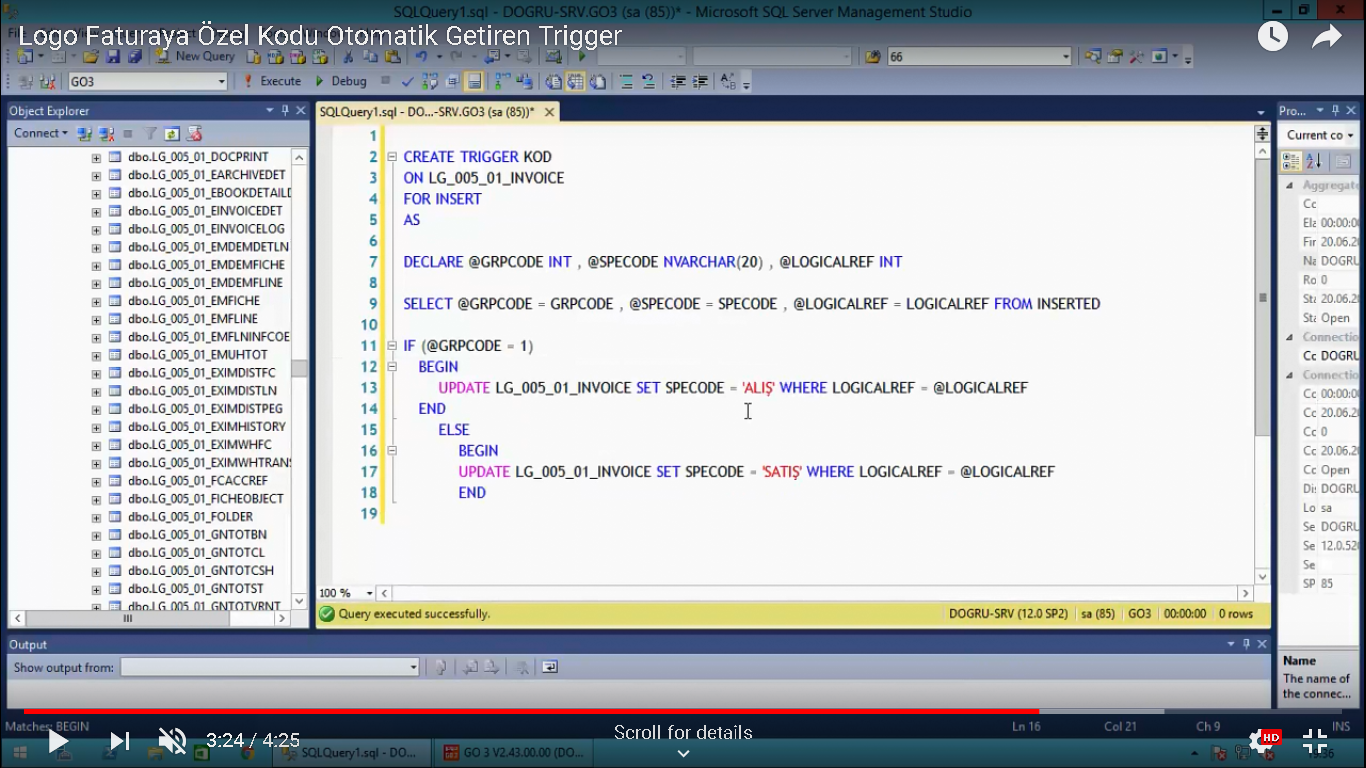
sql server insert trigger basit yol

Logo trigger ozel kod


https://www.youtube.com/watch?v=JFHKa3PEYuQ


CREATE TRIGGER KOD
ON LG_005_01_INVOICE
FOR INSERT
AS
DECLARE @GRPCODE INT, @SPECODE NVARCHAR(20), @LOGICALREF INT

SELECT @GRPCODE = GRPCODE, @SPECODE = SPECODE, @LOGICALREF = LOGICALREF FROM INSERTED

IF (@GRPCODE =1)
BEGIN
UPDATE LG_005_01_INVOICE SET SPECODE = 'ALIŞ' WHERE LOGICALREF = @LOGICALREF
END
ELSE
BEGIN
UPDATE LG_005_01_INVOICE SET SPECODE ='SATIŞ' WHERE LOGICALREF =@LOGICALREF
END

Sql Server HIZLI Sorgu

select * into #satislar from logo_view_satislar_2014_2015 --sql serverde masterin altinda tempdbye atar sadece kullanılan sezondaki kisi erisebilir sql kapanip acilirsa sifirlanir

select yil,sum(toplamtutar) from #satislar group by yil

https://youtu.be/Tl-NWu1VPMc?t=5309

React native app

https://nodejs.org/en/download/ indir ve kur
https://www.sublimetext.com/3 kur
sublime ac->view->show consolea gir ve burdaki kodlari ekle
https://packagecontrol.io/installation
android studio ve bluestack kur
https://www.oracle.com/technetwork/java/javase/downloads/jdk8-downloads-2133151.html
Windows x64 207.22 MB  jdk-8u191-windows-x64.exe kur

cmd
npm install -g expo-cli
npm install -g react-native-cli
npm install -g create-react-native-app
react-native init projectNameHere
cd projectNameHere
react-native run-android


ENVIRMNT USER PATH
%LOCALAPPDATA%\Android\sdk\platform-tools

SYSTEM PATH:C:\Program Files\Java\jdk1.8.0_191
SYSTEM NEW JAVA_HOME C:\Program Files\Java\jdk1.8.0_191
F:\masaustussd\react native\test\android\ klasorunun icine local.properties isminde dosya YARAT ve icine sdk.dir = C:\\Users\\Pnp\\AppData\\Local\\Android\\sdk


Sentez Live Erp Kesin Yevmiyeyi Silme

OIuşan Sorunlar:
- Kesin Yevmiye Tarihinden Önce İşlem Yapılamaz .
- entegrasyon fişi yevmiye madde numarasına sahip. Bu fiş üzerinden işlem yapamazsınız .


select RegBookNo,  * from Erp_GLReceipt --RegBookNo boş deilse yevmiye oluşturulmuş demektir

select * from Erp_GLRegBook --yevmiye oluşan fiş

update  Erp_GLReceipt set RegBookNo = null --yevmiye oluştuysa sil

SQL SERVER SISTEMI KASMADAN SILME WHILE

 DECLARE @Rowcount INT = 1 WHILE @Rowcount > 0 BEGIN DELETE TOP (50000)   FROM  LG_013_01_PAYTRANS where ORGLOGOID LIKE 'TNYF%'
  SET @Rowcount = @@ROWCOUNT
END

ps3 crack filezilla

ethernet kablsonu bagla
Settings > Network Settings > Settings and Connection Status List.  ipyi not et
sarkı usbsini ps3e tak
pacckate setupa gir
sarkı usbsinin içindeki ortadaki programı kur
multimanin oldugu kısımda fileboxa gir ve bilgisardan filezillayı ac
Host: Your PS3's IP address
Port: 21
Logon type: Normal
User: anonymous
Password: (Clear it out and leave it blank)
On the "Transfer settings" tab:
Transfer mode: active
Tick "Limit number of simultaneous connections" and set it to 1
connect okeydir
oyunu "dev_hdd0/GAMEZ" icine at
ve multimane gir refresh yap

LOGO GO XML VERI ALMA SATIN ALMA FATURASI

ILK TYPEIN ALTINA <NUMBER>FATURA NO22</NUMBER> OLURSA DOCNOLARDIR
IKINCI TYPIN ALTINA <INVOICE_NUMBER>FATURA NO22</INVOICE_NUMBER>


ASAGIYI XML OLARAK KAYDET

<?xml version="1.0" encoding="UTF-8"?>
<PURCHASE_INVOICES>
   <INVOICE DBOP="INS">
      <TYPE>1</TYPE>

      <DATE>05.04.2017</DATE>
      <TIME>389550080</TIME>
      <AUXIL_CODE>1</AUXIL_CODE>
      <ARP_CODE>SATICI001</ARP_CODE>
      <POST_FLAGS>247</POST_FLAGS>
      <VAT_RATE>3</VAT_RATE>
      <TOTAL_DISCOUNTED>24</TOTAL_DISCOUNTED>
      <TOTAL_GROSS>24</TOTAL_GROSS>
      <TOTAL_NET>24</TOTAL_NET>
      <TC_NET>24</TC_NET>
      <RC_XRATE>1</RC_XRATE>
      <RC_NET>24</RC_NET>
      <CREATED_BY>1</CREATED_BY>
      <DATE_CREATED>05.04.2018</DATE_CREATED>
      <HOUR_CREATED>23</HOUR_CREATED>
      <MIN_CREATED>57</MIN_CREATED>
      <SEC_CREATED>51</SEC_CREATED>
      <CURRSEL_TOTALS>2</CURRSEL_TOTALS>
      <DATA_SITEID>1</DATA_SITEID>
      <DISPATCHES>
         <DISPATCH>
            <TYPE>1</TYPE>

            <DATE>05.04.2017</DATE>
            <TIME>389550146</TIME>
            <AUXIL_CODE>1</AUXIL_CODE>
            <ARP_CODE>SATICI001</ARP_CODE>
            <INVOICED>1</INVOICED>
            <TOTAL_DISCOUNTED>24</TOTAL_DISCOUNTED>
            <TOTAL_GROSS>24</TOTAL_GROSS>
            <TOTAL_NET>24</TOTAL_NET>
            <RC_RATE>1</RC_RATE>
            <RC_NET>24</RC_NET>
            <CREATED_BY>1</CREATED_BY>
            <DATE_CREATED>05.04.2018</DATE_CREATED>
            <HOUR_CREATED>23</HOUR_CREATED>
            <MIN_CREATED>57</MIN_CREATED>
            <SEC_CREATED>52</SEC_CREATED>
            <CURRSEL_TOTALS>2</CURRSEL_TOTALS>
            <DATA_SITEID>1</DATA_SITEID>
            <ORIG_NUMBER>0000000000051667</ORIG_NUMBER>
            <ORGLOGOID />
            <DEDUCTIONPART1>2</DEDUCTIONPART1>
            <DEDUCTIONPART2>3</DEDUCTIONPART2>
            <AFFECT_RISK>0</AFFECT_RISK>
            <DISP_STATUS>1</DISP_STATUS>
         </DISPATCH>
      </DISPATCHES>
      <TRANSACTIONS>
         <TRANSACTION>
            <TYPE>0</TYPE>
            <MASTER_CODE>AŞI0008</MASTER_CODE>
            <QUANTITY>1</QUANTITY>
            <PRICE>24</PRICE>
            <TOTAL>24</TOTAL>
            <CURR_PRICE>160</CURR_PRICE>
            <PC_PRICE>24</PC_PRICE>
            <RC_XRATE>1</RC_XRATE>
            <UNIT_CODE>ADET</UNIT_CODE>
            <UNIT_CONV1>1</UNIT_CONV1>
            <UNIT_CONV2>1</UNIT_CONV2>
            <VAT_INCLUDED>1</VAT_INCLUDED>
            <VAT_BASE>24</VAT_BASE>
            <BILLED>1</BILLED>
            <TOTAL_NET>24</TOTAL_NET>
            <DATA_SITEID>1</DATA_SITEID>
            <DISPATCH_NUMBER>0000000000051667</DISPATCH_NUMBER>
            <DETAILS />
            <DIST_ORD_REFERENCE>0</DIST_ORD_REFERENCE>
            <CAMPAIGN_INFOS>
               <CAMPAIGN_INFO />
            </CAMPAIGN_INFOS>
            <EDT_CURR>160</EDT_CURR>
            <EDT_PRICE>24</EDT_PRICE>
            <ORGLOGOID />
            <DEFNFLDSLIST />
            <MONTH>4</MONTH>
            <YEAR>2017</YEAR>
            <PRCLISTREF>740</PRCLISTREF>
            <PREACCLINES />
         </TRANSACTION>
      </TRANSACTIONS>
      <PAYMENT_LIST>
         <PAYMENT>
            <DATE>05.04.2017</DATE>
            <MODULENR>4</MODULENR>
            <SIGN>1</SIGN>
            <TRCODE>1</TRCODE>
            <TOTAL>24</TOTAL>
            <PROCDATE>05.04.2017</PROCDATE>
            <REPORTRATE>1</REPORTRATE>
            <DISCOUNT_DUEDATE>05.04.2017</DISCOUNT_DUEDATE>
            <PAY_NO>1</PAY_NO>
            <DISCTRLIST />
            <DISCTRDELLIST>0</DISCTRDELLIST>
         </PAYMENT>
      </PAYMENT_LIST>
      <ORGLOGOID />
      <DEFNFLDSLIST />
      <DEDUCTIONPART1>2</DEDUCTIONPART1>
      <DEDUCTIONPART2>3</DEDUCTIONPART2>
      <DATA_LINK_REFERENCE>720683</DATA_LINK_REFERENCE>
      <INTEL_LIST>
         <INTEL />
      </INTEL_LIST>
      <AFFECT_RISK>0</AFFECT_RISK>
      <PREACCLINES />
   </INVOICE>
   <INVOICE DBOP="INS">
      <TYPE>1</TYPE>
      <DATE>05.04.2017</DATE>
      <TIME>389550080</TIME>
      <AUXIL_CODE>1</AUXIL_CODE>
      <ARP_CODE>SATICI001</ARP_CODE>
      <POST_FLAGS>247</POST_FLAGS>
      <VAT_RATE>3</VAT_RATE>
      <TOTAL_DISCOUNTED>24</TOTAL_DISCOUNTED>
      <TOTAL_GROSS>24</TOTAL_GROSS>
      <TOTAL_NET>24</TOTAL_NET>
      <TC_NET>24</TC_NET>
      <RC_XRATE>1</RC_XRATE>
      <RC_NET>24</RC_NET>
      <CREATED_BY>1</CREATED_BY>
      <DATE_CREATED>05.04.2018</DATE_CREATED>
      <HOUR_CREATED>23</HOUR_CREATED>
      <MIN_CREATED>57</MIN_CREATED>
      <SEC_CREATED>51</SEC_CREATED>
      <CURRSEL_TOTALS>2</CURRSEL_TOTALS>
      <DATA_SITEID>1</DATA_SITEID>
      <DISPATCHES>
         <DISPATCH>
            <TYPE>1</TYPE>
            <DATE>05.04.2017</DATE>
            <TIME>389550146</TIME>
            <AUXIL_CODE>1</AUXIL_CODE>
            <ARP_CODE>SATICI001</ARP_CODE>
            <INVOICED>1</INVOICED>
            <TOTAL_DISCOUNTED>24</TOTAL_DISCOUNTED>
            <TOTAL_GROSS>24</TOTAL_GROSS>
            <TOTAL_NET>24</TOTAL_NET>
            <RC_RATE>1</RC_RATE>
            <RC_NET>24</RC_NET>
            <CREATED_BY>1</CREATED_BY>
            <DATE_CREATED>05.04.2018</DATE_CREATED>
            <HOUR_CREATED>23</HOUR_CREATED>
            <MIN_CREATED>57</MIN_CREATED>
            <SEC_CREATED>52</SEC_CREATED>
            <CURRSEL_TOTALS>2</CURRSEL_TOTALS>
            <DATA_SITEID>1</DATA_SITEID>
            <ORIG_NUMBER>0000000000051667</ORIG_NUMBER>
            <ORGLOGOID />
            <DEDUCTIONPART1>2</DEDUCTIONPART1>
            <DEDUCTIONPART2>3</DEDUCTIONPART2>
            <AFFECT_RISK>0</AFFECT_RISK>
            <DISP_STATUS>1</DISP_STATUS>
         </DISPATCH>
      </DISPATCHES>
      <TRANSACTIONS>
         <TRANSACTION>
            <TYPE>0</TYPE>
            <MASTER_CODE>AŞI0008</MASTER_CODE>
            <QUANTITY>1</QUANTITY>
            <PRICE>24</PRICE>
            <TOTAL>24</TOTAL>
            <CURR_PRICE>160</CURR_PRICE>
            <PC_PRICE>24</PC_PRICE>
            <RC_XRATE>1</RC_XRATE>
            <UNIT_CODE>ADET</UNIT_CODE>
            <UNIT_CONV1>1</UNIT_CONV1>
            <UNIT_CONV2>1</UNIT_CONV2>
            <VAT_INCLUDED>1</VAT_INCLUDED>
            <VAT_BASE>24</VAT_BASE>
            <BILLED>1</BILLED>
            <TOTAL_NET>24</TOTAL_NET>
            <DATA_SITEID>1</DATA_SITEID>
            <DISPATCH_NUMBER>0000000000051667</DISPATCH_NUMBER>
            <DETAILS />
            <DIST_ORD_REFERENCE>0</DIST_ORD_REFERENCE>
            <CAMPAIGN_INFOS>
               <CAMPAIGN_INFO />
            </CAMPAIGN_INFOS>
            <EDT_CURR>160</EDT_CURR>
            <EDT_PRICE>24</EDT_PRICE>
            <ORGLOGOID />
            <DEFNFLDSLIST />
            <MONTH>4</MONTH>
            <YEAR>2017</YEAR>
            <PRCLISTREF>740</PRCLISTREF>
            <PREACCLINES />
         </TRANSACTION>
      </TRANSACTIONS>
      <PAYMENT_LIST>
         <PAYMENT>
            <DATE>05.04.2017</DATE>
            <MODULENR>4</MODULENR>
            <SIGN>1</SIGN>
            <TRCODE>1</TRCODE>
            <TOTAL>24</TOTAL>
            <PROCDATE>05.04.2017</PROCDATE>
            <REPORTRATE>1</REPORTRATE>
            <DISCOUNT_DUEDATE>05.04.2017</DISCOUNT_DUEDATE>
            <PAY_NO>1</PAY_NO>
            <DISCTRLIST />
            <DISCTRDELLIST>0</DISCTRDELLIST>
         </PAYMENT>
      </PAYMENT_LIST>
      <ORGLOGOID />
      <DEFNFLDSLIST />
      <DEDUCTIONPART1>2</DEDUCTIONPART1>
      <DEDUCTIONPART2>3</DEDUCTIONPART2>
      <DATA_LINK_REFERENCE>720683</DATA_LINK_REFERENCE>
      <INTEL_LIST>
         <INTEL />
      </INTEL_LIST>
      <AFFECT_RISK>0</AFFECT_RISK>
      <PREACCLINES />
   </INVOICE>


</PURCHASE_INVOICES>