Blog Of Sem

Sentez Dev Mizan Excele

excelde
data -> from other source -> from microsoft query>new data source ilişklendirmeyi yap sorguyada aşağıdakileri yapıştır...

profilerda mizanı çekerken kod:

exec sp_executesql N' if object_id(''tempdb..#GLReceiptBalanceTmp'') is not null drop table #GLReceiptBalanceTmp create table #GLReceiptBalanceTmp ( CompanyId int,AccountId int, AccountCode nvarchar(25) collate database_default, AccountName nvarchar(50) collate database_default ,Debit decimal(28,8),Credit decimal(28,8),DebitBalance decimal(28,8),CreditBalance decimal(28,8) ,ForexDebit decimal(28,8),ForexCredit decimal(28,8),ForexDebitBalance decimal(28,8),ForexCreditBalance decimal(28,8) ,ForexCalculateDebit decimal(28,8),ForexCalculateCredit decimal(28,8),ForexCalculateDebitBalance decimal(28,8),ForexCalculateCreditBalance decimal(28,8) ,InflowQty decimal(28,8),OutflowQty decimal(28,8))  insert into #GLReceiptBalanceTmp (CompanyId,AccountId,AccountCode,AccountName,Debit,Credit,DebitBalance,CreditBalance,ForexDebit,ForexCredit,ForexDebitBalance,ForexCreditBalance ,ForexCalculateDebit,ForexCalculateCredit,ForexCalculateDebitBalance,ForexCalculateCreditBalance,InflowQty,OutflowQty) select A.CompanyId,A.RecId AccountId,A.AccountCode AccountCode,A.AccountName AccountName,isnull(sum(AR.Debit),0) Debit,0 Credit ,case when isnull(sum(AR.Debit),0)>isnull(sum(AR.Credit),0) then round((isnull(sum(AR.Debit),0)-isnull(sum(AR.Credit),0)),2) else 0 end DebitBalance ,case when isnull(sum(AR.Debit),0)<isnull(sum(AR.Credit),0) then round((isnull(sum(AR.Credit),0)-isnull(sum(AR.Debit),0)),2) else 0 end CreditBalance ,isnull(sum(AR.ForexAmount),0)ForexDebit,0 ForexCredit,isnull(sum(AR.ForexAmount),0)ForexDebitBalance,0 ForexCreditBalance ,0 ForexCalculateDebit,0 ForexCalculateCredit,0 ForexCalculateDebitBalance,0 ForexCalculateCreditBalance ,isnull(sum(AR.Quantity),0)InflowQty,0 OutflowQty  from Erp_GLAccount A with (nolock) inner join Erp_GLReceiptItem AR with (nolock) on (A.RecId=AR.AccountId)  left join Erp_GLReceipt ARB with (nolock) on (ARB.RecId=AR.GLReceiptId) left join Erp_CostCenter CC with (nolock) on (CC.RecId=AR.CostCenterId) left join Erp_Project P with (nolock) on (P.RecId=AR.ProjectId)  where  A.CompanyId = 5 and  (A.IsDeleted is null or A.IsDeleted = 0)  and  (AR.IsDeleted is null or AR.IsDeleted = 0)  and AR.Debit <> 0     and isnull(AR.ReceiptType,0) in (1 , 2 , 3 , 4 , 5)  and AR.ReceiptDate between @0ARErp_GLReceiptItemReceiptDate1 and @0ARErp_GLReceiptItemReceiptDate2         group by A.CompanyId,A.RecId,A.AccountCode,A.AccountName
 union all select A.CompanyId,A.RecId AccountId,A.AccountCode AccountCode,A.AccountName AccountName,0 Debit,isnull(sum(AR.Credit),0) Credit ,case when isnull(sum(AR.Debit),0)>isnull(sum(AR.Credit),0) then round((isnull(sum(AR.Debit),0)-isnull(sum(AR.Credit),0)),2) else 0 end DebitBalance ,case when isnull(sum(AR.Debit),0)<isnull(sum(AR.Credit),0) then round((isnull(sum(AR.Credit),0)-isnull(sum(AR.Debit),0)),2) else 0 end CreditBalance ,0 ForexDebit,isnull(sum(AR.ForexAmount),0) ForexCredit,0 ForexDebitBalance,isnull(sum(AR.ForexAmount),0) ForexCreditBalance ,0 ForexCalculateDebit,0 ForexCalculateCredit,0 ForexCalculateDebitBalance,0 ForexCalculateCreditBalance ,0 InflowQty,isnull(sum(AR.Quantity),0) OutflowQty  from Erp_GLAccount A with (nolock) inner join Erp_GLReceiptItem AR with (nolock) on (A.RecId=AR.AccountId)  left join Erp_GLReceipt ARB with (nolock) on (ARB.RecId=AR.GLReceiptId) left join Erp_CostCenter CC with (nolock) on (CC.RecId=AR.CostCenterId) left join Erp_Project P with (nolock) on (P.RecId=AR.ProjectId)  where  A.CompanyId = 5 and  (A.IsDeleted is null or A.IsDeleted = 0)  and  (AR.IsDeleted is null or AR.IsDeleted = 0)  and AR.Credit <> 0     and isnull(AR.ReceiptType,0) in (1 , 2 , 3 , 4 , 5)  and AR.ReceiptDate between @0ARErp_GLReceiptItemReceiptDate1 and @0ARErp_GLReceiptItemReceiptDate2         group by A.CompanyId,A.RecId,A.AccountCode,A.AccountName if object_id(''tempdb..#GLAccountBalanceTmp'') is not null drop table #GLAccountBalanceTmp  create table #GLAccountBalanceTmp ( CompanyId int,AccountId int, AccountCode nvarchar(25) collate database_default, AccountName nvarchar(50) collate database_default ,Debit decimal(28,8),Credit decimal(28,8),DebitBalance decimal(28,8),CreditBalance decimal(28,8) ,DBalance decimal(28,8),CBalance decimal(28,8),ForexDebit decimal(28,8),ForexCredit decimal(28,8) ,ForexDebitBalance decimal(28,8),ForexCreditBalance decimal(28,8),FDBalance decimal(28,8),FCBalance decimal(28,8) ,ForexCalculateDebit decimal(28,8),ForexCalculateCredit decimal(28,8) ,ForexCalculateDebitBalance decimal(28,8),ForexCalculateCreditBalance decimal(28,8),FCDBalance decimal(28,8),FCCBalance decimal(28,8) ,InflowQty decimal(28,8),OutflowQty decimal(28,8)) insert into #GLAccountBalanceTmp (CompanyId,AccountId,AccountCode,AccountName,Debit,Credit,DebitBalance,CreditBalance,DBalance,CBalance,ForexDebit,ForexCredit ,ForexDebitBalance,ForexCreditBalance,FDBalance,FCBalance,ForexCalculateDebit,ForexCalculateCredit,ForexCalculateDebitBalance,ForexCalculateCreditBalance ,FCDBalance,FCCBalance,InflowQty,OutflowQty) select CompanyId,AccountId,AccountCode,AccountName,isnull(sum(Debit),0)Debit,isnull(sum(Credit),0)Credit,isnull(sum(DebitBalance),0)DebitBalance,isnull(sum(CreditBalance),0)CreditBalance ,case when isnull(sum(DebitBalance),0)>isnull(sum(CreditBalance),0) then round(isnull(sum(DebitBalance),0)-isnull(sum(CreditBalance),0),2) else 0 end DBalance ,case when isnull(sum(DebitBalance),0)<isnull(sum(CreditBalance),0) then round(isnull(sum(CreditBalance),0)-isnull(sum(DebitBalance),0),2) else 0 end CBalance ,isnull(sum(ForexDebit),0)ForexDebit,isnull(sum(ForexCredit),0)ForexCredit,isnull(sum(ForexDebitBalance),0)ForexDebitBalance,isnull(sum(ForexCreditBalance),0)ForexCreditBalance ,case when isnull(sum(ForexDebitBalance),0)>isnull(sum(ForexCreditBalance),0) then round(isnull(sum(ForexDebitBalance),0)-isnull(sum(ForexCreditBalance),0),2) else 0 end FDBalance ,case when isnull(sum(ForexDebitBalance),0)<isnull(sum(ForexCreditBalance),0) then round(isnull(sum(ForexCreditBalance),0)-isnull(sum(ForexDebitBalance),0),2) else 0 end FCBalance ,isnull(sum(ForexCalculateDebit),0)ForexCalculateDebit,isnull(sum(ForexCalculateCredit),0)ForexCalculateCredit ,isnull(sum(ForexCalculateDebitBalance),0)ForexCalculateDebitBalance,isnull(sum(ForexCalculateCreditBalance),0)ForexCalculateCreditBalance ,case when isnull(sum(ForexCalculateDebitBalance),0)>isnull(sum(ForexCalculateCreditBalance),0) then round(isnull(sum(ForexCalculateDebitBalance),0)-isnull(sum(ForexCalculateCreditBalance),0),2) else 0 end FCDBalance ,case when isnull(sum(ForexCalculateDebitBalance),0)<isnull(sum(ForexCalculateCreditBalance),0) then round(isnull(sum(ForexCalculateCreditBalance),0)-isnull(sum(ForexCalculateDebitBalance),0),2) else 0 end FCCBalance ,isnull(sum(InflowQty),0)InflowQty,isnull(sum(OutflowQty),0)OutflowQty  from #GLReceiptBalanceTmp  group by CompanyId,AccountId,AccountCode,AccountName  having round(isnull(sum(Debit),0),2) <> round(isnull(sum(Credit),0),2) select A.CompanyId,'''' [Şirket],isnull((select MF.ForexCode from Meta_Forex MF where MF.RecId=A.ForexId),'''') [Dvz],'''' [HDvz],A.AccountCode [Hesap Kodu],A.AccountName [Hesap Adı],A.SpecialCode [Özel Kod],0.0 [Devir Borç],0.0 [Devir Alacak],sum(isnull(B.Debit,0)) [Borç],sum(isnull(B.Credit,0)) [Alacak],case when sum(isnull(B.DBalance,0)) > sum(isnull(B.CBalance,0)) then sum(isnull(B.DBalance,0)) - sum(isnull(B.CBalance,0)) when sum(isnull(B.DBalance,0)) < sum(isnull(B.CBalance,0)) then sum(isnull(B.CBalance,0)) - sum(isnull(B.DBalance,0)) else 0 end [Bakiye],case when sum(isnull(B.DBalance,0)) > sum(isnull(B.CBalance,0)) then ''BB'' when sum(isnull(B.DBalance,0)) < sum(isnull(B.CBalance,0)) then ''AB'' else '''' end [Bakiye Tipi],sum(isnull(B.DBalance,0)) [Borç Bakiye],sum(isnull(B.CBalance,0)) [Alacak Bakiye],sum(isnull(B.ForexDebit,0)) [Döviz Borç],sum(isnull(B.ForexCredit,0)) [Döviz Alacak],case when sum(isnull(B.FDBalance,0)) > sum(isnull(B.FCBalance,0)) then round(sum(isnull(B.FDBalance,0)) - sum(isnull(B.FCBalance,0)),2) when sum(isnull(B.FDBalance,0)) < sum(isnull(B.FCBalance,0)) then round(sum(isnull(B.FCBalance,0)) - sum(isnull(B.FDBalance,0)),2) else 0 end [Döviz Bakiye],case when sum(isnull(B.FDBalance,0)) > sum(isnull(B.FCBalance,0)) then ''BB'' when sum(isnull(B.FDBalance,0)) < sum(isnull(B.FCBalance,0)) then ''AB'' else '''' end  [Döviz Bakiye Tipi],sum(isnull(B.FDBalance,0)) [Döviz Borç Bakiye],sum(isnull(B.FCBalance,0)) [Döviz Alacak Bakiye],sum(isnull(B.ForexCalculateDebit,0)) [Hesaplanan Döviz Borç],sum(isnull(B.ForexCalculateCredit,0)) [Hesaplanan Döviz Alacak],case when sum(isnull(B.FCDBalance,0)) > sum(isnull(B.FCCBalance,0)) then round(sum(isnull(B.FCDBalance,0)) - sum(isnull(B.FCCBalance,0)),2)when sum(isnull(B.FCDBalance,0)) < sum(isnull(B.FCCBalance,0)) then round(sum(isnull(B.FCCBalance,0)) - sum(isnull(B.FCDBalance,0)),2) else 0 end  [Hesaplanan Döviz Bakiye],case when sum(isnull(B.FCDBalance,0)) > sum(isnull(B.FCCBalance,0)) then ''BB'' when sum(isnull(B.FCDBalance,0)) < sum(isnull(B.FCCBalance,0)) then ''AB'' else '''' end  [Hesaplanan Döviz Bakiye Tipi],sum(isnull(B.FCDBalance,0)) [Hesaplanan Döviz Borç Bakiye],sum(isnull(B.FCCBalance,0)) [Hesaplanan Döviz Alacak Bakiye],sum(isnull(B.InflowQty,0)) [Giriş Miktarı],sum(isnull(B.OutflowQty,0)) [Çıkış Miktarı],sum(isnull(B.InflowQty,0)) - sum(isnull(B.OutflowQty,0)) [Kalan],-1 CAccount  from Erp_GLAccount A with (nolock)  left join #GLAccountBalanceTmp B on (B.AccountId in(select AA.RecId from Erp_GLAccount AA where AA.CompanyId=A.CompanyId and AA.AccountCode like rtrim(A.AccountCode)+''%'' ))  where  A.CompanyId = 5 and  (A.IsDeleted is null or A.IsDeleted = 0)    group by A.CompanyId,A.ForexId,A.AccountCode,A.AccountName,A.SpecialCode  having round(isnull(sum(B.Debit),0),2) <> round(isnull(sum(B.Credit),0),2) order by A.AccountCode

if object_id(''tempdb..#GLReceiptTmp'') is not null drop table #GLReceiptTmp if object_id(''tempdb..#GLReceiptBalanceTmp'') is not null drop table #GLReceiptBalanceTmp  if object_id(''tempdb..#GLAccountBalanceTmp'') is not null drop table #GLAccountBalanceTmp  ',N'@0ARErp_GLReceiptItemReceiptDate1 datetime,@0ARErp_GLReceiptItemReceiptDate2 datetime',@0ARErp_GLReceiptItemReceiptDate1='2017-01-01 00:00:00',@0ARErp_GLReceiptItemReceiptDate2='2018-12-31 23:59:00'


snt v6 cr

sentez v6 cr
önce sentezin yüklü olduğu pcde VolumeSerial.exe çalıştırıp serialnumberi bir yere not et ör: B43D-9414. ve d sürücüsünün adı ornegin sentez se onuda not et ve sentez.prm yi kopyala

daha sonra kendi pcnden VolumeSerial.exe  yönetici olarak calıstır ve new numbera yaz : B43D9414 ok de

daha sonra sürücünün adı lisanslı pcde neyse onu yap d yi

Sentez live dev replikasyon

port 1347 - serverdede clienttede internet sağlayıcılarından statik ip talep etmeleri gerekir. server ve client iç iplerine 1347 portunu yönlendirmeleri gerekir ve server iç ipleri statik olması gerekir...


sentez v6 kısayol direk başlasın

"D:\Yedek D\ONBASIOGLU\Excellen.exe" ADMIN 01 3322

ADMIN KULLANICI ADI SIRKET 01 SIFRE 3322

sql server kill and rename database

--TEST DATABASE AKTİF ET
ALTER DATABASE LKSDB
SET SINGLE_USER WITH ROLLBACK IMMEDIATE
GO
sp_rename 'LKSDB', 'LKSDBORJ' ,'DATABASE';
GO
ALTER DATABASE LKSDBORJ
SET MULTI_USER
GO


ALTER DATABASE LKSDBTEST
SET SINGLE_USER WITH ROLLBACK IMMEDIATE
GO
sp_rename 'LKSDBTEST', 'LKSDB' ,'DATABASE';
GO
ALTER DATABASE LKSDB
SET MULTI_USER
GO


--ORJİNAL DB AKTİF ET
ALTER DATABASE LKSDB
SET SINGLE_USER WITH ROLLBACK IMMEDIATE
GO
sp_rename 'LKSDB', 'LKSDBTEST' ,'DATABASE';
GO
ALTER DATABASE LKSDBTEST
SET MULTI_USER
GO


ALTER DATABASE LKSDBORJ
SET SINGLE_USER WITH ROLLBACK IMMEDIATE
GO
sp_rename 'LKSDBORJ', 'LKSDB' ,'DATABASE';
GO
ALTER DATABASE LKSDB
SET MULTI_USER
GO

xml to excel

excel 2003 ama 2010dada test edildi ondada oldu
önce indir : https://www.microsoft.com/en-us/download/details.aspx?id=3108
sonra excelden
excel file options ->addins -> go -> browse ->
C:\Office Samples\OfficeExcel2003XMLToolsAddin\XmlTools.xla bul tamam de exceli kapat aç ve xmli aç okdir.

sentez v6 stok resim

boyutu w=100 h=90 yazıda olsun ve stok kartının altından stok resminden yükle uzantısı jpg olacak


Google Drive\sentez yazılım\Resim.rar v6nın kurulu oldugu exenin bulundugu yere atılırsa isimlere göre ikonlar oluşur

VISUAL C# SQL AYNI KOD VARMI KONTROL

      private void button3_Click(object sender, EventArgs e)
        {
            SqlConnection sqlConnection = new SqlConnection("Server = " + logoserver + "; Database = " + logodb + "; User Id = " + logouser + "; Password = " + logopass);


            using (SqlCommand sqlCommand = new SqlCommand("SELECT COUNT(*) from ZV_LOGO_HASTA where KODU = 112", sqlConnection))
            {
                sqlConnection.Open();
                int userCount = (int)sqlCommand.ExecuteScalar();
                if (userCount > 0)
                {
                    MessageBox.Show("BU KOD VAR");
                }
                else MessageBox.Show("BU KOD YOK");
            }
            sqlConnection.Close();
        }

Visual studio 2015le oracle db bağlantısı

Oracle Developer Tools for Visual Studio 2015 indir http://www.oracle.com/technetwork/developer-tools/visual-studio/overview/index.html

kur  ve kodlar
using System;
using System.Collections.Generic;
using System.ComponentModel;
using System.Data;
using System.Drawing;
using System.Linq;
using System.Text;

using System.Windows.Forms;
using System.IO;
using Oracle.ManagedDataAccess;
using Oracle.ManagedDataAccess.Client;

namespace OracleTest
{
    public partial class Form1 : Form
    {
        public Form1()
        {
            InitializeComponent();
        }
        string oradb;
        private void Form1_Load(object sender, EventArgs e)
        {
       //bağlantı
            StreamReader sr = new StreamReader("dbConnect.txt");
            oradb = sr.ReadLine();
            sr.Close();


        }

        private void button1_Click(object sender, EventArgs e)
        {

            OracleConnection conn = new OracleConnection(oradb);
            conn.Open();
            StreamReader sr = new StreamReader("sql1.txt");
            string sql1 = sr.ReadLine();
            sr.Close();

            OracleCommand cmd = new OracleCommand();
            cmd.Connection = conn;
            cmd.CommandText = sql1;
            cmd.CommandType = CommandType.Text;
            OracleDataAdapter da = new OracleDataAdapter(cmd);
            DataSet ds = new DataSet();
            da.Fill(ds, "ss");
            gridControl1.DataSource = ds.Tables["ss"];
            //OracleDataReader dr = cmd.ExecuteReader();
            //dataGridView1.DataSource = dr;

            //while (dr.Read())
            //{
            //    listBox1.Items.Add(dr.GetString(2));
            //}
            //conn.Dispose();

        }
    }
}


dbconnect.txt
Data Source=ORCL;User Id=hr;Password=hr;

windows iso usbye atma

Burdan https://www.microsoft.com/en-us/download/details.aspx?id=56485

Windows USB/DVD Download Tool 

indir ve isoyu göstererk usbye başlat ornegin ultra isodan atarsan atmaz 10 gb tek dosya mesela windows 10da var atmaz kopyalamaz bile usbye tek dosya 10 gbı burdan yaparsan okdir .ama

virtual box remote desktop

virtual box remote desktop kullanımı
işletim sistemi seçilir ayarlar

şuna takıldı: köprü bağdaştırıcısı
adı ana bilgisayarının bağlı oldugu bağlantı türü lansa ethernet networkse wifi
ekran ayarından uzak görüntü aktif deilse aktifleştir

SQL 2014TEN 2008E VERİTABANI KOPYALA

sql server 2014'ten 2008e database kopyalama

önce sql server 2014'ten isdenilen databasee sağ tıklanıp
task
generate script
bütün tablolar
advanceddan schema and table ve serve version 2008 yapılır

next next finish yapılır
nereye kaydedildiyse o script usbye kopyalanır cmdyi yönetici olarak açıp örnek olarak aşağıdaki komut yazilir
sqlcmd -S DESKTOP-VFSMD2M\SQL2008 -i "d:/c.sql"

not sql scriptinin içinden veritabanı adını deiştir alter malter yazan

Hizli şekilde dosyalarının yetkisini fulle (uygulama)

Google Drive\visual studio\yetki ayari

Visual studio bunifu component

To install Bunifu:
1. Open Visual Studio
2. Create a new project
3. Right click in the toolbox and click "choose items"
4. Click browse and select the Bunifu .dll
5. You're finished. You should now see the Bunifu controls in your toolbox.
Google Drive\visual studio\BUNIFU

Visual studio Projeni lisanslama olaylari


Özetle CryptoLicesnsi kur ve crackle sonra aç programı visual studioda proje yeni de refereransa cyrptolicensin kurulduğu klasörden LogicNP.CryptoLicensing.dll ekle. Ve cryptolicense programına geri geç project get validationdan kodunu al.
Google Drive\visual studio\cryptolisans\CryptoLicensingNet2015Enterprise.rar

Aşağıda serili ama tam calısmıyor

            string licOrSerial = "3SNK-JR68-VWR4-CU3U-DK5T-6M4Y-TGNU-W99Z"; // may be entered by user
            CryptoLicense lic = new CryptoLicense("AMAAMACcdnLRtdM/BVep5vzxoSJkHW04yTbB6RBlL3AebAgDpcaAJ5m3ygqP8ueGL1ZQA1EDAAEAAQ==");
            lic.LicenseServiceURL = "<<URL of your license service>>";

            // Try to validate serial and retrieve license against the serial
            SerialValidationResult result = lic.GetLicenseFromSerial(licOrSerial);
            if (result == SerialValidationResult.Failed)
            {
                // 'licOrSerial' is in serial form but validation of serial failed
                MessageBox.Show("Serial Validation Failed");
                return;
            }
            else if (result == SerialValidationResult.NotASerial)
            {
                // 'licOrSerial' is not a serial but may be a license, set lic.LicenseCode and validate it
                lic.LicenseCode = licOrSerial;
            }
            else //if (result == SerialValidationResult.Success)
            {
                // CryptoLicense.GetLicenseFromSerial set the lic.LicenseCode with the retrieved license code
                // validate it
            }
            // Validate license by querying Status property
            if (lic.Status != LicenseStatus.Valid)
            {
                MessageBox.Show("License Validation Failed");
                return;
            }

To start using CryptoLicensing for the licensing and copy-protection of your software, follow these simple steps:
In CryptoLicensing Generator:
  1. Start the CryptoLicensing Generator application from the Start Menu.
  2. Create a new license project : File menu --> Create New Project --> accept default settings by clicking OK button.
  3. Save the license project : File menu --> Save Project.
  4. Get the validation code for your project : Project menu --> Get Validation Key And Code.
  5. Generate a simple license code without any settings : simply click the Generate button. A new license code will be generated and displayed in the bottom textbox.
In Your Software Source Code Project:
  • Reference the LogicNP.CryptoLicensing.dll file from your project. This is the CryptoLicensing validation module. Note: For Silverlight, Windows Phone 7, or other kinds of projects, see Deploying Your Software for the exact assembly to reference.
  • At the top of your code file, add the following namespace declarations:
  using LogicNP.CryptoLicensing;
  • Write simple license validation code as follows:
    
            CryptoLicense lic = new CryptoLicense();
            lic.ValidationKey = "validation key obtained in step #4 above";
            lic.LicenseCode = "license code generated in step #5 above";


            // Validate the license using .Status property
            if (lic.Status != LicenseStatus.Valid)
                throw new Exception("license validation failed");

That's it! Its that simple to start using CryptoLicensing for the licensing of your software.


Further Code Samples
The above code is a very simplistic code. Typically, you will not hard-code a license code in your software in the above manner, but load it as follows:
                       ...
                       ...

            // Load license from the registry
            lic.StorageMode = LicenseStorageMode.ToRegistry;
            if (lic.Load() == false)
                throw new Exception("License could not be loaded");

            // Validate the license using .Status property
            if (lic.Status != LicenseStatus.Valid)
                throw new Exception("license validation failed");

For the load method to succeed, there should be a previously saved license code in the first place. The license code is saved by calling the CryptoLicense.Save method in another part of your software which prompts the user for the license code. If you use the CryptoLicense.ShowEvaluationInfoDialog method to prompt the user for the license code, the dialog will automatically call the Save method for you.

If you are validating licenses requiring communication with the license service, make sure you specify the license service URL before validating the license code as follows:
                       ...
                       ...
            lic.LicenseServiceURL = "http://www.mysite.com/LicenseService/Service.asmx"

            // Validate the license using .Status property
            if (lic.Status != LicenseStatus.Valid)
                throw new Exception("license validation failed");


Further code samples demonstrating a variety of common licensing scenarios can be found in the Samples folder under the installation folder.


Visual studio c# dlleri projene exeye gömme

projeyi ac solution exlporerda en yukarı sag tıkla manage nuget packetse bas yada
view others package manager consola bunu yaz indirsin Install-Package Costura.Fody
indirdikten sonra dllerin exele gömülü olur

visual c# gridview with parameter

 private void button1_Click_3(object sender, EventArgs e)
        {
            string connectionString = null;
            SqlConnection cnn;
            connectionString = "Server = " + AYARLAR.txtServerc + "; Database = " + AYARLAR.txtVeritabanic + "; User Id = " + AYARLAR.txtKullanicic + "; Password = " + AYARLAR.txtParolac;

            FileInfo file = new FileInfo(Application.StartupPath + "\\SQL.txt");
            string script = file.OpenText().ReadToEnd();

            cnn = new SqlConnection(connectionString);

            SqlDataAdapter da = new SqlDataAdapter(script, cnn);
            da.SelectCommand.Parameters.AddWithValue("@tarih1", dateEdit1.Text);
            da.SelectCommand.Parameters.AddWithValue("@tarih2", dateEdit2.Text);
            DataTable dt = new DataTable();

            da.Fill(dt);
            gridControl1.DataSource = dt;
            gridView1.ExpandAllGroups();
            gridView1.GroupFooterShowMode = GroupFooterShowMode.VisibleAlways;
            // Create and setup the first summary item.


            GridGroupSummaryItem item1 = new GridGroupSummaryItem();
            item1.FieldName = "Odeme Tutari";
            item1.SummaryType = DevExpress.Data.SummaryItemType.Sum;
            item1.DisplayFormat = "Odeme Tutari {0:c2}";
            item1.ShowInGroupColumnFooter = gridView1.Columns["Odeme Tutari"];
            gridView1.GroupSummary.Add(item1);

            {
                //GridView RunTime Gruplama
                GridColumn Grupla = gridView1.Columns["Odeme Tipi"];

                gridView1.BeginSort();
                try
                {
                    gridView1.ClearGrouping();
                    Grupla.GroupIndex = 0;
                }
                finally
                {
                    gridView1.EndSort();
                }
                gridView1.ExpandAllGroups();
            }

            gridView1.Columns["Odeme Tutari"].SummaryItem.SummaryType = DevExpress.Data.SummaryItemType.Sum;
            gridView1.Columns["Odeme Tutari"].SummaryItem.DisplayFormat = "Odeme Toplam = {0}";
            gridView1.BestFitColumns();
            gridView1.Columns["Odeme Tutari"].DisplayFormat.FormatType = FormatType.Numeric;
            gridView1.Columns["Odeme Tutari"].DisplayFormat.FormatString = "c2";

            gridView1.Columns["Iade Tutari"].SummaryItem.SummaryType = DevExpress.Data.SummaryItemType.Sum;
            gridView1.Columns["Iade Tutari"].SummaryItem.DisplayFormat = "Iade Toplam = {0}";
            gridView1.BestFitColumns();
            gridView1.Columns["Iade Tutari"].DisplayFormat.FormatType = FormatType.Numeric;
            gridView1.Columns["Iade Tutari"].DisplayFormat.FormatString = "c2";

            gridView1.Columns["Odeme Tipi"].SortOrder = DevExpress.Data.ColumnSortOrder.Descending;

            gridView1.BestFitColumns();
        }

Devexpress gridview export customised header

using DevExpress.XtraPrinting;
using DevExpress.Printing.ExportHelpers;
using DevExpress.Export;

private void simpleButton1_Click(object sender, EventArgs e) {
    // Ensure that the data-aware export mode is enabled.
    DevExpress.Export.ExportSettings.DefaultExportType = ExportType.DataAware;           
    // Create a new object defining how a document is exported to the XLSX format.
    XlsxExportOptionsEx options = new XlsxExportOptionsEx();
    // Subscribe to the CustomizeSheetHeader event. 
    options.CustomizeSheetHeader += options_CustomizeSheetHeader;
    // Export the grid data to the XLSX format.
    string file = "grid-export.xlsx";
    gridControl.ExportToXlsx(file, options);
    // Open the created document.
    System.Diagnostics.Process.Start(file);           
}

void options_CustomizeSheetHeader(DevExpress.Export.ContextEventArgs e) {
    // Create a new row.
    CellObject row = new CellObject();
    // Specify row values.
    row.Value = "The document is exported from the IssueList database.";
    // Specify row formatting.
    XlFormattingObject rowFormatting = new XlFormattingObject();
    rowFormatting.Font = new XlCellFont { Bold = true, Size = 14 };
    rowFormatting.Alignment = new DevExpress.Export.Xl.XlCellAlignment { HorizontalAlignment = DevExpress.Export.Xl.XlHorizontalAlignment.Center, VerticalAlignment = DevExpress.Export.Xl.XlVerticalAlignment.Top };
    row.Formatting = rowFormatting;
    // Add the created row to the output document.
    e.ExportContext.AddRow(new [] {row});
    // Add an empty row to the output document.
    e.ExportContext.AddRow();
    // Merge cells of two new rows. 
    e.ExportContext.MergeCells(new DevExpress.Export.Xl.XlCellRange(new DevExpress.Export.Xl.XlCellPosition(0, 0), new DevExpress.Export.Xl.XlCellPosition(5, 1)));
}

Visual c# ms sql database çifte kontrol

           SqlConnection connectionString = new SqlConnection("Server = " + ondegerler.SQLBAGLANTISI_KAYNAK + "; Database = " + ondegerler.SQLBAGLANTISI_VERITABANI + "; User Id = " + ondegerler.SQLBAGLANTISI_KULLANICI + "; Password = " + ondegerler.SQLBAGLANTISI_PAROLA);
            connectionString.Open();
            {
             
                SqlCommand sqlcom2 = new SqlCommand("select count(malzeme_kodu) from tbl_malzeme  where tbl_malzeme.malzeme_kodu = '" + Text_malzeme_kodu.Text + "'", connectionString);

                if (sqlcom2.ExecuteScalar() != null)
                {
                    int UserExist = (int)sqlcom2.ExecuteScalar();
                    if (UserExist > 0)
                    {
                        MessageBox.Show("Bu İsimde Malzeme Kodu Daha Önceden Yaratılmıştır!");
                    }
                }

visual c# update ms sql table from query inside txt file

 // MessageBox.Show(Text_malzeme_grubu.EditValue.ToString());
            //  string connectionString = null;
            SqlConnection connectionString = new SqlConnection("Server = " + ondegerler.SQLBAGLANTISI_KAYNAK + "; Database = " + ondegerler.SQLBAGLANTISI_VERITABANI + "; User Id = " + ondegerler.SQLBAGLANTISI_KULLANICI + "; Password = " + ondegerler.SQLBAGLANTISI_PAROLA);
            connectionString.Open();
            FileInfo file = new FileInfo(Application.StartupPath + "\\tbl_cari_kartlari_duzenle_kaydet.txt");
            string duzenle = file.OpenText().ReadToEnd();
            //MessageBox.Show(silinecekkod.ToString());
            SqlCommand sqlcom = new SqlCommand(duzenle, connectionString);
            sqlcom.Parameters.AddWithValue("@cari_turu", Text_cari_turu.Text.Trim());
            sqlcom.Parameters.AddWithValue("@cari_adi", Text_cari_adi.Text.Trim());
            sqlcom.Parameters.AddWithValue("@irtibat", Text_irtibat.Text.Trim());
            sqlcom.Parameters.AddWithValue("@adres", Text_adres.Text.Trim());
            sqlcom.Parameters.AddWithValue("@paremetre", text_paremetre.Text.Trim());
            sqlcom.Parameters.AddWithValue("@cari_kodu", Text_cari_kodu.Text.Trim());

            sqlcom.ExecuteNonQuery();
            connectionString.Close();
            MessageBox.Show("Cari Başarıyla Düzenlendi!", "CARİ KARTI DÜZENLEME", MessageBoxButtons.OK, MessageBoxIcon.Information);
----------------------------------------------------------
txt file =
update tbl_cariler
set cari_turu=@cari_turu , cari_adi = @cari_adi ,irtibat=@irtibat , adres = @adres, paremetre = @paremetre
where cari_kodu = @cari_kodu

gridview connect to ms sql with txt file query and get data to gridview with summary


            string connectionString = null;
            SqlConnection cnn;
            connectionString = "Server = " + ondegerler.SQLBAGLANTISI_KAYNAK + "; Database = " + ondegerler.SQLBAGLANTISI_VERITABANI + "; User Id = " + ondegerler.SQLBAGLANTISI_KULLANICI + "; Password = " + ondegerler.SQLBAGLANTISI_PAROLA;
            FileInfo file = new FileInfo(Application.StartupPath + "\\tbl_cariler.txt");
            string script = file.OpenText().ReadToEnd();
            cnn = new SqlConnection(connectionString);
            SqlDataAdapter da = new SqlDataAdapter(script, cnn);
            DataTable dt = new DataTable();
            da.Fill(dt);
            gridControl1.DataSource = dt;
            gridView1.Columns[1].SummaryItem.SummaryType = DevExpress.Data.SummaryItemType.Count;
            gridView1.Columns[1].SummaryItem.DisplayFormat = "Adet = {0}";

            gridView1.Columns["Bakiye"].SummaryItem.SummaryType = DevExpress.Data.SummaryItemType.Sum;
            gridView1.Columns["Bakiye"].SummaryItem.DisplayFormat = "Toplam = {0}";
            gridView1.BestFitColumns();

Devexpress grid databar

            GridFormatRule gridFormatRule = new GridFormatRule();
            FormatConditionRuleDataBar formatConditionRuleDataBar = new FormatConditionRuleDataBar();
            gridFormatRule.Column = gridView1.Columns["Bakiye"];
            formatConditionRuleDataBar.PredefinedName = "Blue Gradient";
            gridFormatRule.Rule = formatConditionRuleDataBar;
            this.gridView1.FormatRules.Add(gridFormatRule);


Devexpress gridview export to excel with savefiledialog

         
            string filename;
            saveFileDialog1.Filter = "xlsx files (*.xlsx)|*.xlsx";
            saveFileDialog1.FilterIndex = 2;
            saveFileDialog1.RestoreDirectory = true;
            saveFileDialog1.ShowDialog();
            filename = saveFileDialog1.FileName;
            if (filename == "") filename = "";
            else
            {
                gridView1.ExportToXlsx(filename);
                System.Diagnostics.Process.Start(filename);
            }

VISUAL STUDIO 2013 VISUAL BASIC GRIDE EXCELDEN YAPIŞTIR

VISUAL STUDIO 2013 VISUAL BASIC GRIDE EXCELDEN YAPIŞTIR

ONCE BU FONKSIYONU EKLE;
----------------------
Sub pastefromclipboardtodatagridview(ByVal dgv As DataGridView)
        Dim rowSplitter As Char() = {vbCr, vbLf}
        Dim columnSplitter As Char() = {vbTab}

        'get the text from clipboard

        Dim dataInClipboard As IDataObject = Clipboard.GetDataObject()
        Dim stringInClipboard As String = CStr(dataInClipboard.GetData(DataFormats.Text))

        'split it into lines
        Dim rowsInClipboard As String() = stringInClipboard.Split(rowSplitter, StringSplitOptions.RemoveEmptyEntries)

        'get the row and column of selected cell in grid
        Dim r As Integer = dgv.SelectedCells(0).RowIndex
        Dim c As Integer = dgv.SelectedCells(0).ColumnIndex

        'add rows into grid to fit clipboard lines
        If (dgv.Rows.Count < (r + rowsInClipboard.Length)) Then
            dgv.Rows.Add(r + rowsInClipboard.Length - dgv.Rows.Count)
        End If

        ' loop through the lines, split them into cells and place the values in the corresponding cell.
        Dim iRow As Integer = 0
        While iRow < rowsInClipboard.Length
            'split row into cell values
            Dim valuesInRow As String() = rowsInClipboard(iRow).Split(columnSplitter)
            'cycle through cell values
            Dim iCol As Integer = 0
            While iCol < valuesInRow.Length
                'assign cell value, only if it within columns of the grid
                If (dgv.ColumnCount - 1 >= c + iCol) Then
                    dgv.Rows(r + iRow).Cells(c + iCol).Value = valuesInRow(iCol)
                End If
                iCol += 1
            End While
            iRow += 1
        End While

    End Sub

---------------

1 ADET DATAGRIDVIEW YARAT
1 ADET BUTTON YARAT
CİFT TIKLA BUTTONA
KOD:
        DataGridView1.AllowUserToAddRows = False
        DataGridView1.Rows.Add()
        pastefromclipboardtodatagridview(DataGridView1)
        DataGridView1.AllowUserToAddRows = False
        DataGridView1.Rows.Add()
        pastefromclipboardtodatagridview(DataGridView1)

Wordpress Yit woocommerce Back to top turkce yap

/wp-content/themes/regency/theme/functions-template.php

Bul;
echo '<div id="back-top"><a href="#top"><i class="fa fa-chevron-up"></i>' . __('Back to top', 'yit') . '</a></div>';


Deiştir;
echo '<div id="back-top"><a href="#top"><i class="fa fa-chevron-up"></i>' . __('Yukarı Git', 'yit') . '</a></div>';

wordpress woocommerce yit framework search for türkçe yapma

Bunu bul ve deieştir: /wp-content/themes/regency/theme/templates/searchform/post.php

<?php
/*
 * This file belongs to the YIT Framework.
 *
 * This source file is subject to the GNU GENERAL PUBLIC LICENSE (GPL 3.0)
 * that is bundled with this package in the file LICENSE.txt.
 * It is also available through the world-wide-web at this URL:
 * http://www.gnu.org/licenses/gpl-3.0.txt
 */
?>

<div class="searchform">
    <form role="search" method="get" id="searchform" action="<?php echo home_url( '/' ); ?>">
        <div>
            <label class="screen-reader-text" for="s"><?php _e( 'Ara:', 'yit' ) ?></label>
            <div class="search-wrapper"><input  type="text" value="" name="s" id="s"  /></div>
            <input  type="submit" class="button" id="searchsubmit" value="<?php _e( 'Ara', 'yit' ) ?>" />
            <?php
            $post_types =  apply_filters( 'yit_searchform_post_types', array( 'post' ) );

            foreach( $post_types as $post_type ) : ?>
                <input type="hidden" name="post_type[]" value="<?php echo $post_type ?>" />
            <?php endforeach ?>
        </div>
    </form>
</div>

vs 2013 c# Devexpress gridview sağ tıklayarak excel dosyası olarak kaydet

Forma 1 adet contextMenuStrip1 ve 1 adet saveFileDialog1 at gridControl1de ki dataları excele kaydetmek için;


using System;
using System.Collections.Generic;
using System.ComponentModel;
using System.Data;
using System.Drawing;
using System.Text;
using System.Linq;
using System.Windows.Forms;
using DevExpress.XtraEditors;
using System.Data.OleDb;
using DevExpress.XtraGrid.Columns;
using DevExpress.XtraGrid.Views.Grid;


contextMenuStrip1  tıkla Excele kaydet item yarat ve çift tıkla ve yaz;

            //excele kaydet
            string filename;
            saveFileDialog1.Filter = "xlsx files (*.xlsx)|*.xlsx";
            saveFileDialog1.FilterIndex = 2;
            saveFileDialog1.RestoreDirectory = true;
            saveFileDialog1.ShowDialog();
            filename = saveFileDialog1.FileName;
            if (filename == "") filename = ""; else gridView1.ExportToXlsx(filename);

Daha sonra gridcontrola tıkla ve contextmenustripini contextMenuStrip1 olarak seç

Visual C# 2013 Windows 7 Programa taskabara kısayollar ekleme IKONLU


using System;
using System.Collections.Generic;
using System.ComponentModel;
using System.Data;
using System.Drawing;
using System.Linq;
using System.Text;
using System.Windows.Forms;
using Microsoft.WindowsAPICodePack.Taskbar;
using Microsoft.WindowsAPICodePack.Shell;
using System.IO;
using System.Reflection;
using System.Diagnostics;


             private void Form1_Shown(object sender, EventArgs e)
        {
            //KISAYOLLAR DOSYA YOLLARI
            string VP = "D:\\Dosyalar\\semih\\visionpluskontrol32bit\\VisionPlusKontrol32bit\\VisionPlusKontrol32bit\\bin\\Debug\\VisionPlusKontrol32bit.exe";
            string OTOMASYON = "D:\\vs 2013 projeleri\\vp\\vpws\\vpws2\\EasyEkontor3g\\EasyEkontor3g\\bin\\Debug\\EasyEkontor3g.exe";
            string DOSTELWEB = "http://182.125.142.9/ws/";
            string DOSTELWEBICONIE = "C:\\Program Files\\Internet Explorer\\iexplore.exe";

            //SIK KULLANILANLAR DOSYA YOLLARI
            string COREL = "C:\\Program Files\\Corel\\CorelDRAW Graphics Suite X6\\Programs64\\CorelDRW.exe";
            string PHOTOSHOP = "D:\\Program Files\\Adobe\\Adobe Photoshop CC 2015\\Photoshop.exe";
            string DOSYALARVEBOYUTLAR = "D:\\Program Files (x86)\\WinDirStat\\windirstat.exe";
            string SEARCHEVERYTHING = "D:\\Program Files\\Everything\\Everything.exe";
            string SMSCASTER = "C:\\Program Files (x86)\\SMSCaster\\smscaster.exe";

            JumpList KISAYOLLAR = JumpList.CreateJumpList();
            KISAYOLLAR.ClearAllUserTasks();
            JumpListLink JLLVP = new JumpListLink(VP, "VP") { IconReference = new IconReference(VP, 0) };
            JumpListLink JLLOTOMASYON = new JumpListLink(OTOMASYON, "OTOMASYON") { IconReference = new IconReference(OTOMASYON, 0) };
            JumpListLink JLLDOSTELWEB = new JumpListLink(DOSTELWEB, "DOSTEL WEB") { IconReference = new IconReference(DOSTELWEBICONIE, 0) };
            JumpListCustomCategory kategori = new JumpListCustomCategory("KISAYOLLAR");
            kategori.AddJumpListItems(JLLVP);
            kategori.AddJumpListItems(JLLOTOMASYON);
            kategori.AddJumpListItems(JLLDOSTELWEB);
            KISAYOLLAR.AddCustomCategories(kategori);

            JumpListLink JLLCOREL = new JumpListLink(COREL, "COREL X6") { IconReference = new IconReference(COREL, 0) };
            JumpListLink JLLPHOTOSHOP = new JumpListLink(PHOTOSHOP, "PHOTOSHOP 2015") { IconReference = new IconReference(PHOTOSHOP, 0) };
            JumpListLink JLLDOSYALARVEBOYUTLAR = new JumpListLink(DOSYALARVEBOYUTLAR, "WINDIRSTAT DOSYA BOYUTLARI") { IconReference = new IconReference(DOSYALARVEBOYUTLAR, 0) };
            JumpListLink JLLSEARCHEVERYTHING = new JumpListLink(SEARCHEVERYTHING, "SEARCH EVERYTHING") { IconReference = new IconReference(SEARCHEVERYTHING, 0) };
            JumpListLink JLLSMSCASTER = new JumpListLink(SMSCASTER, "SMS CASTER") { IconReference = new IconReference(SMSCASTER, 0) };
            JumpListCustomCategory kategori2 = new JumpListCustomCategory("SIK KULLANILANLAR");
            kategori2.AddJumpListItems(JLLCOREL);
            kategori2.AddJumpListItems(JLLPHOTOSHOP);
            kategori2.AddJumpListItems(JLLDOSYALARVEBOYUTLAR);
            kategori2.AddJumpListItems(JLLSEARCHEVERYTHING);
            kategori2.AddJumpListItems(JLLSMSCASTER);
            KISAYOLLAR.AddCustomCategories(kategori2);
            KISAYOLLAR.Refresh();
        }

Python ile webden altın fiyatlarını çekme

import re , urllib
liste=["Kuyumcu Alis","Kuyumcu Satis"]
# size gerekli olan adres
website=urllib.urlopen("http://www.bigpara.com/altin/ceyrek-altin-fiyati")
htmltext=website.read()
# site icinde altin fiyatinin bulundugu alan
getinspect='<span class="value up">(.+?)</span>'
pattern=re.compile(getinspect)
price=re.findall(pattern,htmltext)
j=0
for i in price:
    print liste[j]+" fiyati: "+i
    j+=1


output: 
Kuyumcu Alis fiyati: 226,72
Kuyumcu Satis fiyati: 232,39

Python 27 beatifulsoap siteden tüm linkleri çek

önce cmd satırında pip.exeyi bul ve easy_install bs4
pip install lxml


from bs4 import BeautifulSoup
import urllib2

resp = urllib2.urlopen("http://www.gpsbasecamp.com/national-parks")
soup = BeautifulSoup(resp,  "lxml")

for link in soup.find_all('a', href=True):
    print link['href']


alternatif

from bs4 import BeautifulSoup
import urllib
import re

html_page = urllib.urlopen("http://arstechnica.com")
soup = BeautifulSoup(html_page, "lxml")
for link in soup.findAll('a', attrs={'href': re.compile("^http://")}):
    print link.get('href')

Python ms sql servere bağlan

sql server kütüphanesi yüklü deilse yükle pip install pyodbc

import pyodbc
cnxn = pyodbc.connect('DRIVER={SQL Server};SERVER=192.168.1.200;DATABASE=TIGER;UID=testu;PWD=testp')
cursor = cnxn.cursor()
cursor.execute("select * from LG_INVOICE")
rows = cursor.fetchall()
for row in rows:
    print row.DATE_


Python kütüphane ekleme

python 27 kurulduğu klasöre örnek c:\pyhton27\script cmd satırıyla git ve pip install pyodc örnek entere bas kurar.


not: cmdnin klasöre sağ tıkladığında aktif olmasını isdersen HKEY_CLASSES_ROOT\Directory\shell\cmd
den Extendedi sil ve artık klasörlere shifte basılı tutarak sağ tıklarsan okeydir...


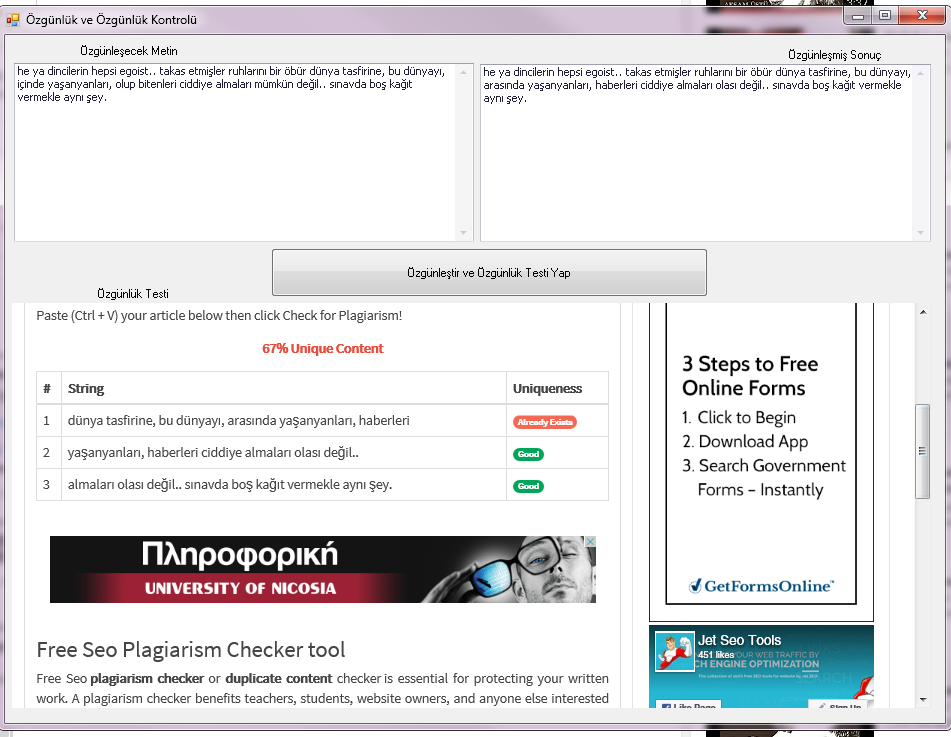
VB .NET'de Yazı özgünleştirme ve özgünleştirme testi yapma kodları SEO

Forma eklenmesi gerekenler; Kaynak kodları için bana ulaşabilirsiniz...


Kodlar:

Public Class Form1


    Private Sub Button1_Click(sender As Object, e As EventArgs) Handles Button1.Click

        WebBrowser1.Document.GetElementById("makale").SetAttribute("value", MemoEdit1.Text)
        'WebBrowser1.Document.GetElementById("İşlemi Yap").InvokeMember("click")

        'kontor attıktan sonra cıkan ekranda tamamama bas
        For Each Element As HtmlElement In WebBrowser1.Document.GetElementsByTagName("input")

            If Element.OuterHtml.Contains("İşlemi Yap") Then

                Element.InvokeMember("click")
                Exit For

            End If

        Next Element
        WebBrowser2.Navigate("http://www.jetseotools.com/free-seo-plagiarism-checker")
        Timer1.Enabled = True


    End Sub

    Private Sub Timer1_Tick(sender As Object, e As EventArgs) Handles Timer1.Tick
        For Each Element As HtmlElement In WebBrowser1.Document.GetElementsByTagName("input")

            If Element.OuterHtml.Contains("Demo Göster") Then

                Element.InvokeMember("click")
                Exit For

            End If

        Next Element


        Timer1.Enabled = False
        Timer2.Enabled = True
    End Sub


    Private Sub Timer2_Tick(sender As Object, e As EventArgs) Handles Timer2.Tick

        Dim Elems As HtmlElementCollection = WebBrowser1.Document.GetElementsByTagName("textarea")
        For Each Elem As HtmlElement In Elems
            'Loop through until you find the one that needs updating (in your case it is named proxylist)
            If Elem.Id = "demo" Then
                'Update the TextArea Text
                '   Elem.InnerHtml = "My Text"
                MemoEdit2.Text = Elem.InnerHtml
                Exit For
            End If
        Next Elem
        MemoEdit2.Text = Split(MemoEdit2.Text, "kelime say")(0)
        Timer2.Enabled = False
        Timer3.Enabled = True
    End Sub


    Private Sub Timer3_Tick(sender As Object, e As EventArgs) Handles Timer3.Tick
        Dim Elems As HtmlElementCollection = WebBrowser2.Document.GetElementsByTagName("textarea")
        For Each Elem As HtmlElement In Elems
            'Loop through until you find the one that needs updating (in your case it is named proxylist)
            If Elem.Id = "mycontent" Then
                'Update the TextArea Text
                '   Elem.InnerHtml = "My Text"
                Elem.InnerHtml = MemoEdit2.Text
                Exit For
            End If
        Next Elem

        For Each Element As HtmlElement In WebBrowser2.Document.GetElementsByTagName("a")

            If Element.OuterHtml.Contains("Check for Plagiarism") Then

                Element.InvokeMember("click")
                Exit For

            End If

        Next Element
        WebBrowser2.Focus()
        SendKeys.Send("^-")

        WebBrowser1.Navigate("http://wmtikk.com/arac/yazi-ozgunlestirici")


        Timer3.Enabled = False
    End Sub

    Private Sub Form1_Load(sender As Object, e As EventArgs) Handles MyBase.Load
        Dim fileReader As System.IO.StreamReader
        fileReader =
        My.Computer.FileSystem.OpenTextFileReader("saniye.txt")
        Dim stringReader1 As String

        stringReader1 = fileReader.ReadLine()
        Timer1.Interval = stringReader1


    End Sub
End Class